
1 KVR member has added DR Neural Guitar v1 to 1 MyKVR group 1 time.
Download KVR Studio Manager (FREE)
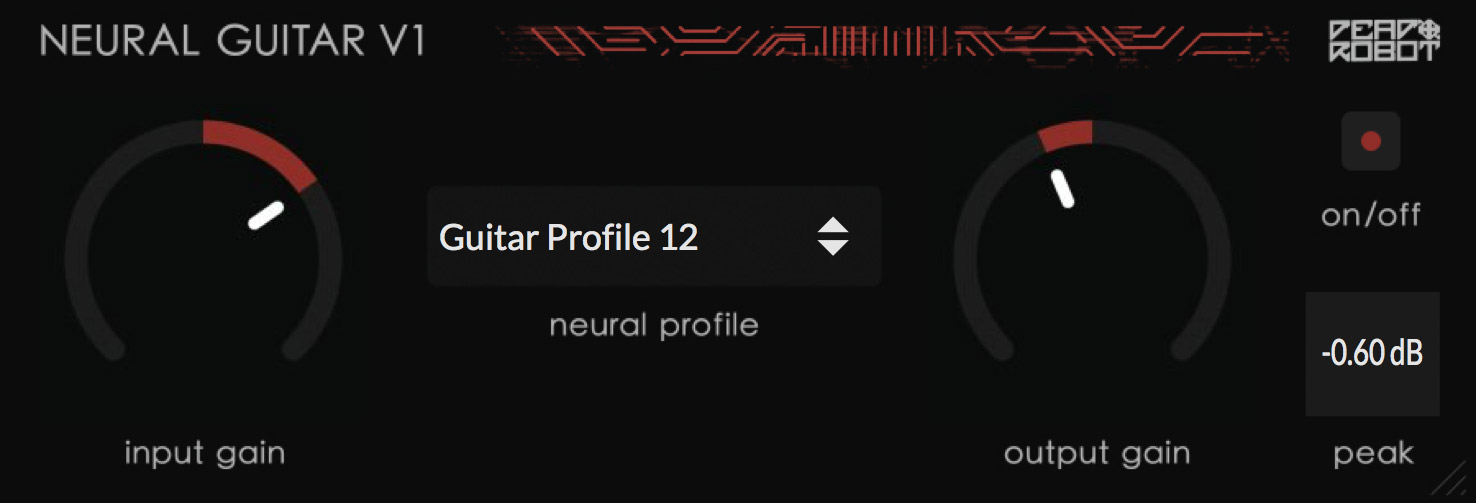
Neural Guitar v1 is a new electric guitar tone shaping VST plugin which uses neural networks trained on my actual guitar fx chains to accurately reproduce and condense my guitar sound into 1 minimal low latency plugin. Baking down all my saturation, compression, irs, and eq for 16 different unique guitar fx chains ive created over the years, it contains both cleaner and more intense crunched out profiles, for a variety of styles and genres. Switching between profiles can also be automated to quickly jump between tones too! This neural net technology creates a sharable, cross-platform, multi-DAW compatible guitar plugin that anyone can use simply and affordably.
main features:
1. 16 Neural Profiles - accurate neural network models of my actual electric guitar chains on released songs.
2. Input/Output Gain Controls.
3. Neural Profile On/Off Switch (for comparison).
4. Hard Clip/Peak Output Control.
How I Use It:
Simply put the plugin on your guitar input track and click through the neural profiles to find one which sounds the best to you. Next, adjust the input and output gain to fit the neural network just right to sound how you like it. Personally I love to also throw 2 of my free Ethereal Verb v2 plugins in too, one before with a super short reverb like the 'width' or 'quick' to turn the mono guitar input into a wide stereo signal, and one longer ethereal verb after Neural Guitar for a long ethereal decay, like the 'ohm haven' preset or 'covered in light' or 'singularity.' there's no rules though, and this plugin might also sound amazing on synths, vocals, drums or a sampled instagram reel of a cat meowing, so definitely experiment and have fun.
NOTE: this plugin takes a few seconds to start up initializing the neural networks, and uses a decent amount of CPU and processing power; I can personally run 2-3 of them in a project with no issues.
Requirements:
mac: OS X 10.11 and up.
windows: windows 10 and up.

Please log in to join the discussion
Submit: News, Plugins, Hosts & Apps | Advertise @ KVR | Developer Account | About KVR / Contact Us | Privacy Statement | Sell @ KVR | KVR Marketplace Terms & Conditions
© KVR Audio, Inc. 2000-2026

