
68 KVR members have added Duplex Comp to 58 MyKVR groups 77 times.
Download KVR Studio Manager (FREE)
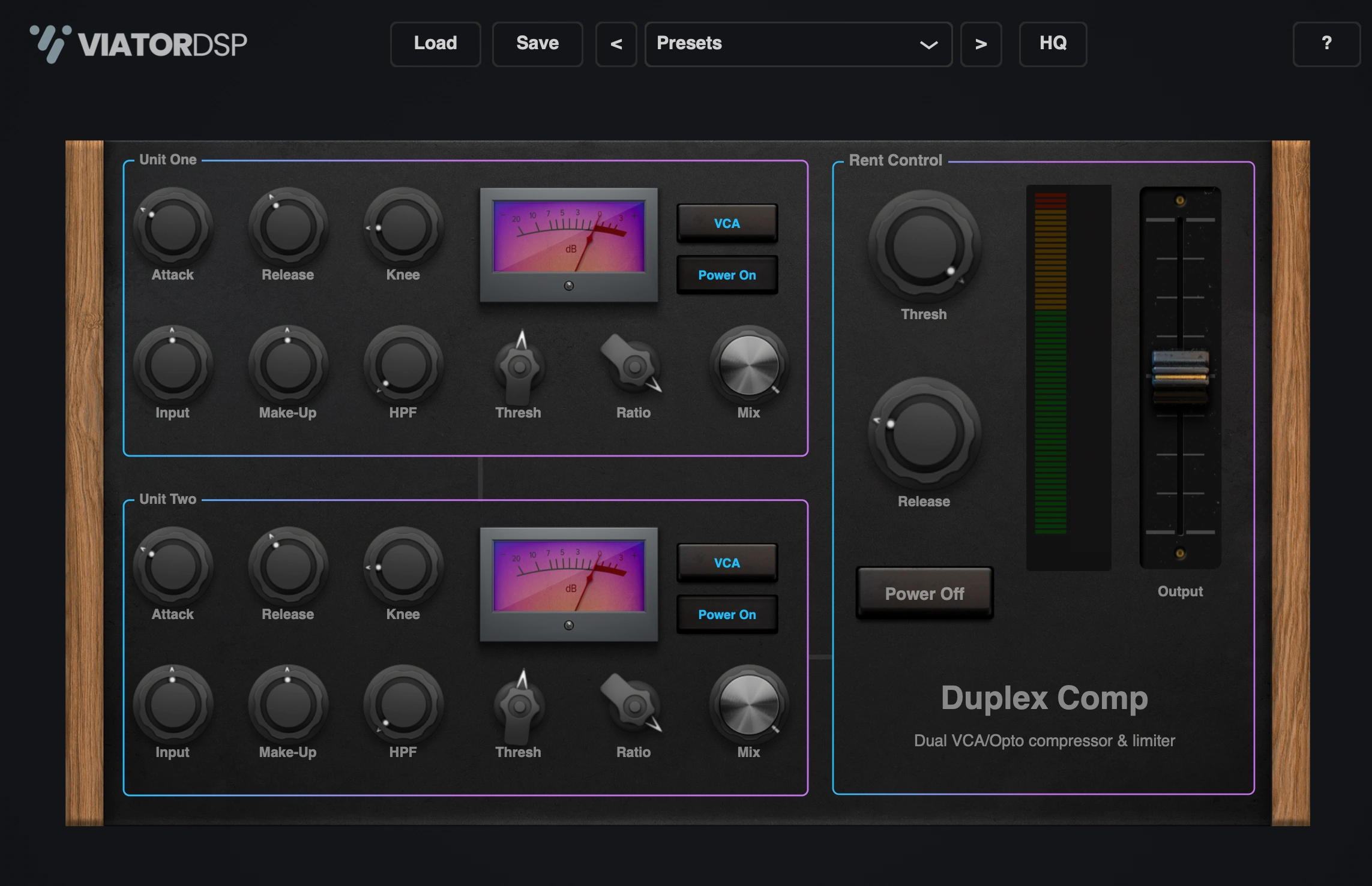
Duplex Comp combines two serially cascading compressors, followed by a limiter, into one efficient package. This plugin streamlines a popular mixing method—employing multiple compressors in series, each with different settings—by consolidating the entire process into one convenient interface.
In the GUI, you'll see the compressors are cleverly referred to as "Units," while the limiter is humorously named "Rent Control"—a playful nod to the plugin's name, Duplex.
The signal flow for Duplex Comp is as follows: Unit 1 (Compressor 1) -> Unit 2 (Compressor 2) -> Rent Control (Limiter).
The plugin comes with a set of built-in factory presets, and these are integrated directly into the plugin itself. This means you can create and save your own presets, even using the same names as the factory presets, without causing any conflicts. Your custom presets, referred to as user presets, are saved separately.
When you save a user preset, it's stored in a specific folder on your computer. This folder is typically located in your "Documents" directory and is named after the plugin. In the plugin's preset menu, user presets are listed under the "User" section. The saved preset files themselves can be found in the aforementioned folder in your "Documents."
Additionally, the plugin provides a "Load" button, located in the preset bar at the top (the header) of the interface. You can use this button to load presets from any location on your computer. However, it's important to note that the plugin can only load presets that are compatible with its structure. Generally, any preset saved using this plugin should load without issues, as it will match the required structure. This means you can download and load presets made with this plugin from other users.
Engage High-Quality (HQ) mode to enable oversampling. Oversampling reduces aliasing - unwanted artifacts in your audio - by processing the signal at a higher sample rate. This results in a cleaner, more precise sound, particularly useful for mastering or when working with high-frequency content. Note that HQ mode will increase CPU usage.
The Free version does not contain:
 $199.00Pro-C 3
 $149.00Presswerk
Please log in to join the discussion
Submit: News, Plugins, Hosts & Apps | Advertise @ KVR | Developer Account | About KVR / Contact Us | Privacy Statement | Sell @ KVR | KVR Marketplace Terms & Conditions
© KVR Audio, Inc. 2000-2026

