
4 KVR members have added E-DistortionFX500 (JSFX) to 4 MyKVR groups 6 times.
Download KVR Studio Manager (FREE)
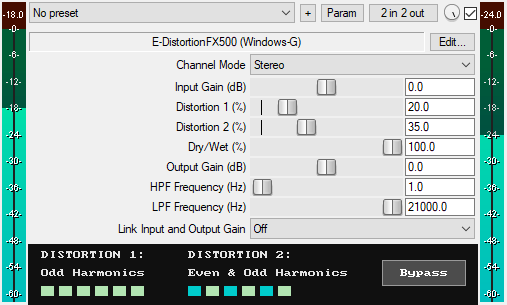
A JSFX distortion effect for REAPER that offers:
Two Distortion Types:
* Distortion 1 (0% to 100%): Generates only odd harmonics through aggressive symmetric hard clipping. Sounds slightly "thinner" or "cleaner" than Distortion 2 due to the generation of only one harmonic type (i.e., odd harmonics). Features automatic level compensation that increases as the distortion amount increases, helping to maintain consistent output levels. At 0%, Distortion 1 is bypassed entirely.
* Distortion 2 (0% to 100%): Generates both even and odd harmonics through aggressive asymmetric hard clipping. Sounds slightly "thicker" or "richer" than Distortion 1 due to the addition of the even harmonic content. Features automatic level compensation that increases as the distortion amount increases, helping to maintain consistent output levels. At 0%, Distortion 2 is bypassed entirely.
* Stereo/Mid/Side Modes: Apply distortion equally to the left and right channels (Stereo), to the mono component only (Mid), or to the stereo width component only (Side).
* Input Gain (-40 dB to +40 dB): Boosts or attenuates the input signal level before distortion processing. Higher input gain gives more aggressive distortion, while lower input gives softer distortion.
* Dry/Wet Mix (0% to 100%): Blend between the original signal and the distorted signal, from 0% (fully dry) to 100% (fully distorted).
* Output Gain (-40 dB to +40 dB): Sets the final output level of the plugin to compensate for volume changes.
* High-Pass Filter (1 Hz – 20 kHz): Applies adjustable high-pass filter to the wet signal. The filter becomes active only when the frequency is set above 0 Hz.
* Low-Pass Filter (20 Hz – 21 kHz): Applies adjustable low-pass filter to the wet signal. It can be used to simulate the high-frequency roll-off of analog analog distortion pedals. The filter becomes active only when the frequency is set below 21 kHz.
* Link Input and Output Gain: When enabled, it creates an inverse relationship between the Input Gain and Output Gain, where moving the Input Gain up automatically reduces the Output Gain by the same amount, and vice versa.
* GUI Bypass Button: A smooth bypass button for toggling the effect on or off without audio clicks. It is available for automation as "Bypass (Smooth)" in the plugin's parameter list.
* Zipper-Noise-Free Operation: Advanced interpolation ensures no zipper noise during slider automation and real-time adjustments.
* Minimal CPU usage.
You can grab it for FREE.
Email Support: info.windowsg@gmail.com
==================================================
Using This JSFX Plugin in Other DAWs:
If you want to use this JSFX plugin in other DAWs, you can do so using the open-source YSFX plugin.
YSFX is available in VST3, AU, and CLAP formats for Windows, macOS, and Linux.
Download your preferred version of YSFX from here (Click on "Assets" for the downloads to appear):
https://github.com/JoepVanlier/ysfx/releases
YSFX comes in two versions:
* ysfx-s FX (for JSFX effects).
* ysfx-s instrument (for JSFX instruments).
1. Open ysfx-s FX in your DAW,
2. Then click "Load", find your "E-DistortionFX500_Windows-G" file, and click "Open."
The JSFX plugin will now run inside the YSFX host, working perfectly in any DAW that supports VST3, AU, or CLAP plugins.

Please log in to join the discussion
Submit: News, Plugins, Hosts & Apps | Advertise @ KVR | Developer Account | About KVR / Contact Us | Privacy Statement | Sell @ KVR | KVR Marketplace Terms & Conditions
© KVR Audio, Inc. 2000-2026

