
0 KVR members have added Ears and Ears to 0 MyKVR groups 0 times.
Download KVR Studio Manager (FREE)
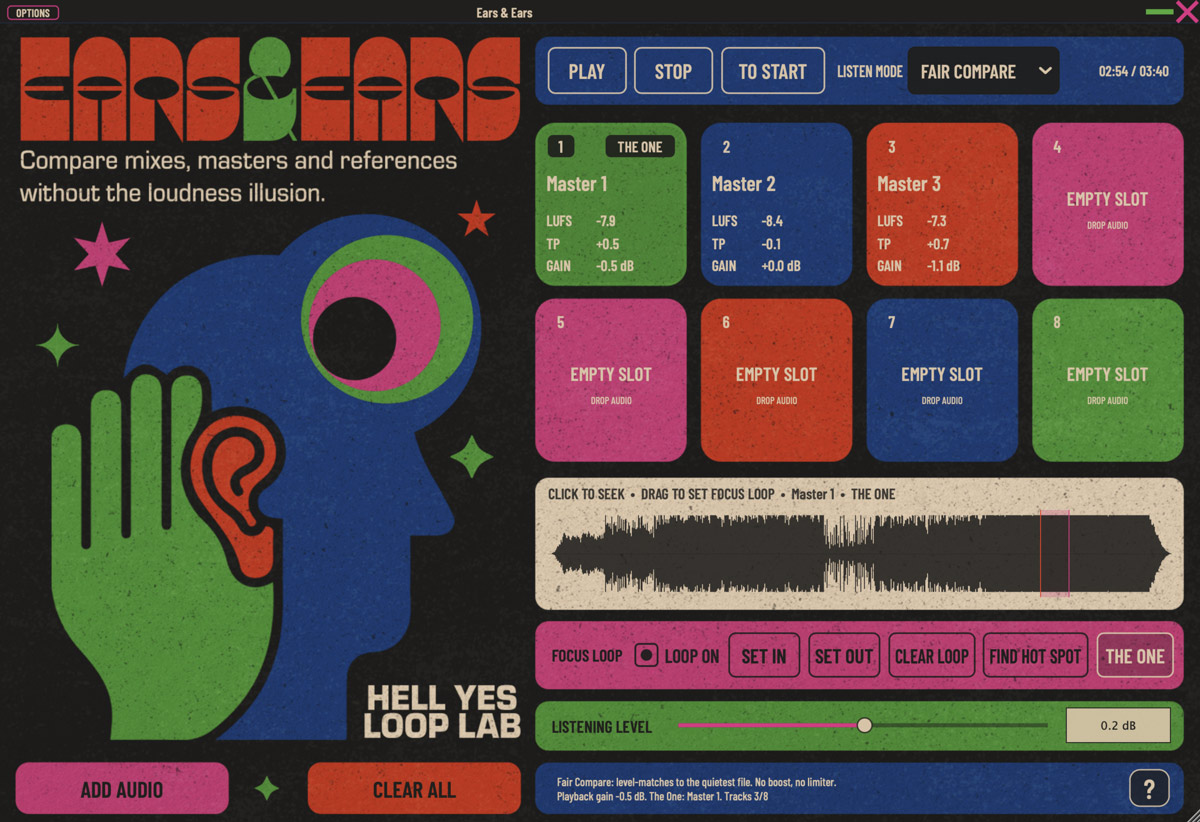
Ears and Ears is a standalone application for comparing mixes, masters and reference tracks without being misled by loudness.
Load up to eight audio files, switch between versions instantly and use Fair Compare to match playback to the quietest loaded file. Louder files are turned down rather than quieter files being boosted, helping remove the common impression that a version sounds better simply because it is louder.
Ears and Ears includes LUFS and True Peak readouts, streaming loudness previews, a Focus Loop for comparing the same musical section across multiple versions, waveform navigation, Find Hot Spot and The One marker for identifying the preferred version.
It does not master, limit, normalize, export or modify the original audio files. It is a focused listening tool designed to make mix, master and reference comparison faster, clearer and more honest.
Main features:
• Compare up to eight audio files
• Instant switching between versions
• Fair Compare loudness matching
• LUFS and True Peak readouts
• Streaming loudness preview
• Focus Loop with Set In and Set Out
• Waveform navigation
• Find Hot Spot
• The One marker
• Standalone operation with no DAW required.
Supported formats include WAV, AIFF, FLAC, MP3 and M4A.
Available for macOS and Windows.

Please log in to join the discussion
Submit: News, Plugins, Hosts & Apps | Advertise @ KVR | Developer Account | About KVR / Contact Us | Privacy Statement | Sell @ KVR | KVR Marketplace Terms & Conditions
© KVR Audio, Inc. 2000-2026

