0 KVR members have added Gravity Channel to 0 MyKVR groups 0 times.
Download KVR Studio Manager (FREE)
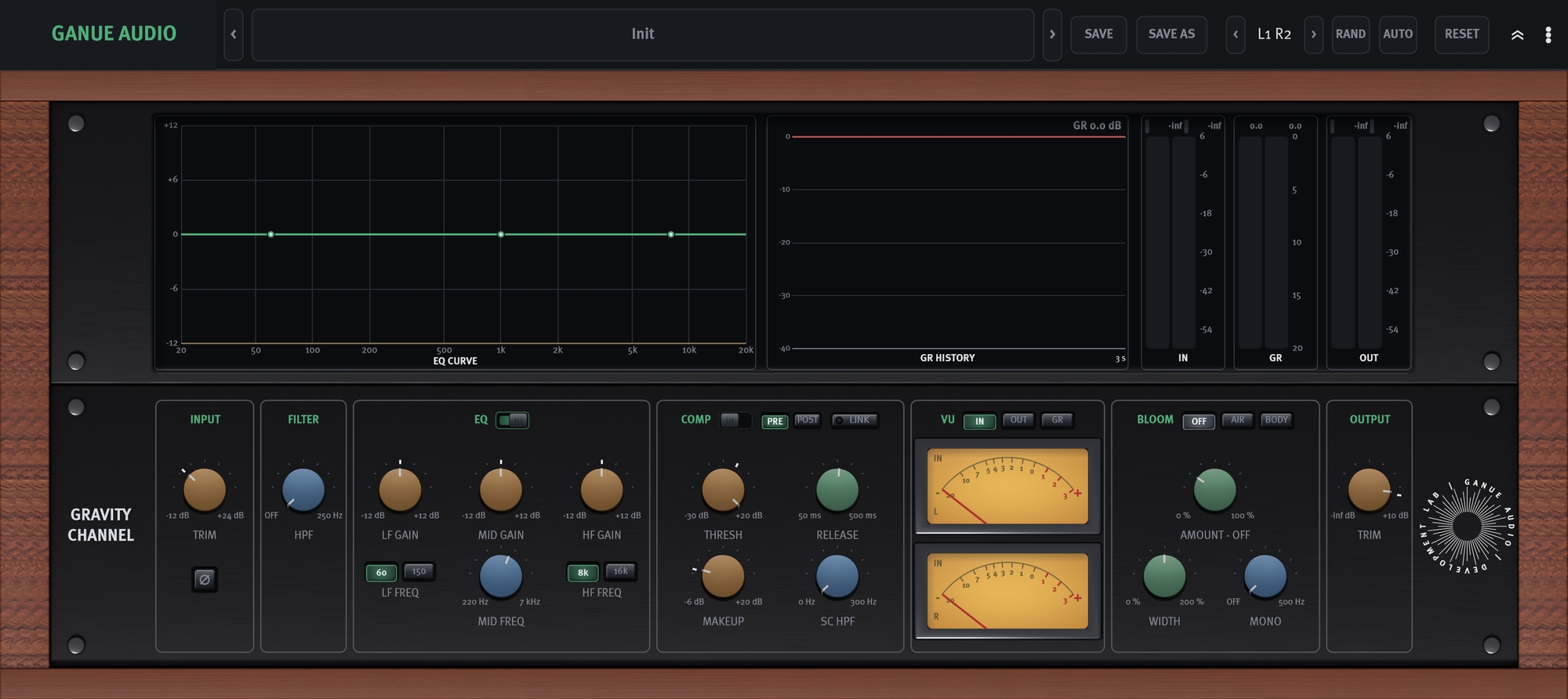
Gravity Channel brings the everyday tools of a mixing chain together in one calm, precise front panel: input trim and polarity, a high-pass filter, a three-band EQ, a smooth compressor, a harmonic BLOOM stage, and a clean output trim. It is built to sit on any track and do the ordinary jobs well - shape tone, control dynamics, add weight or air, and set level - without leaving the strip.
Left at its defaults it stays neutral and transparent, letting the source speak. Color is something you add deliberately, in measured amounts. The three-band EQ is voiced to be easy on the ear: gentle LF and HF shelves (each with two switchable corners) and a swept mid with a proportional Q that stays broad on small moves and grows more focused on larger ones. The compressor is a natural, smooth VCA design with RMS detection - a fixed 2:1 ratio, soft knee, and a fast fixed attack that lets transients through cleanly.
BLOOM is GANUE's harmonic output stage. It adds gentle, program-dependent second- and third-harmonic content in the spirit of classic Class A transformer output stages, with two voicings: Air for sheen and openness, Body for weight and warmth. A little goes a long way.
Metering is generous: a live EQ-curve display, a scrolling gain-reduction history, IN/GR/OUT bar meters, and an analog VU (switchable IN/OUT/GR). On stereo tracks you also get stereo width and a mono-maker as final stereo shaping.
Free. No iLok, no activation. macOS and Windows.

Please log in to join the discussion
Submit: News, Plugins, Hosts & Apps | Advertise @ KVR | Developer Account | About KVR / Contact Us | Privacy Statement | Sell @ KVR | KVR Marketplace Terms & Conditions
© KVR Audio, Inc. 2000-2026