Log InCreate An Account
  1. Plugins
  2. »
  3. Monster DAW
  4. »
  5. Monster Synth
  6. »
  7. Details

Monster Synth

Monster Synth
Monster Synth by Monster DAW is a Virtual Instrument Audio Plugin for macOS and Windows. It functions as a VST Plugin, an Audio Units Plugin and a VST 3 Plugin.
Product
Version
2.9.1
Product
Version
2.9.1
Instrument
Formats

MyKVR: Groups, Versions, ...

207 KVR members have added Monster Synth to 186 MyKVR groups 234 times.

Download KVR Studio Manager (FREE)

Not In Your MY KVR Groups
(or group limitation prevents versioning)
+186 in private groups

KVR Rank

Overall: 5910   4710   5225

30-Day: 8676; 7-Day: 7411; Yesterday: 15933

Monster Synth Features:

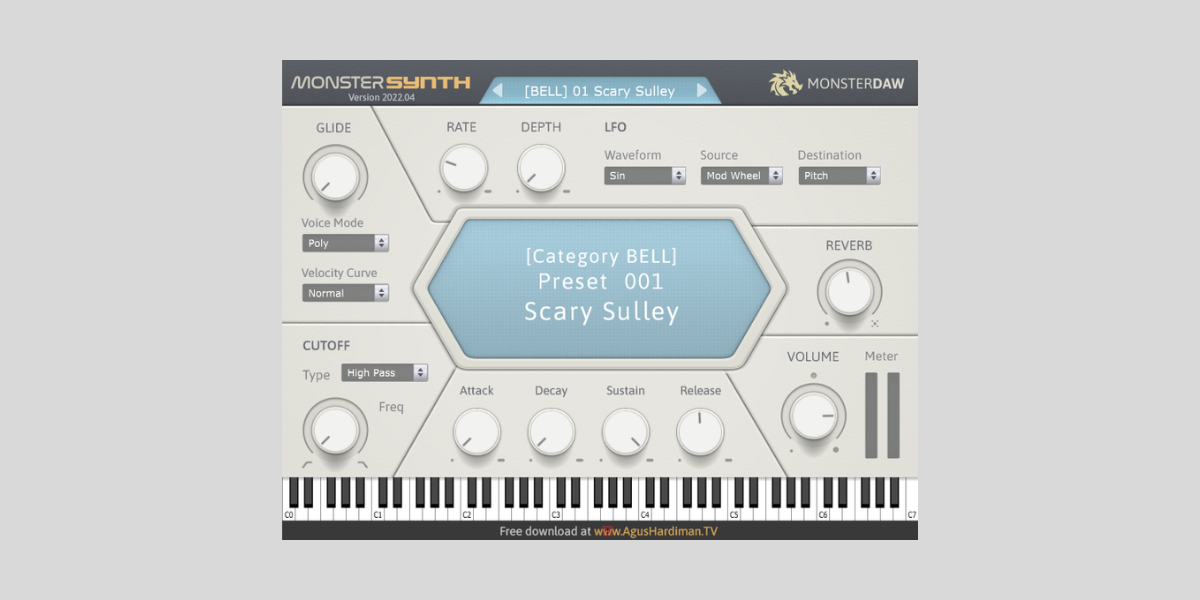
  • Lightweight and doesn't consume much CPU like any other synth (It's because this is a sample-based synth).
  • 200 presets. I know presets numbers are useless unless the sound is good (I hope all the presets are useful to you as a music maker).
  • There are 12 preset categories: Bass, Bell, Brass, Hit, Lead, Mallet, Pad, Pluck, Riser, Strings, Vox, and Weird SFX.
  • Preset description and preset tips for ideas on how to tailor the sound to your liking.
  • Level Meter dan Master Volume.
  • Volume envelope: ADSR (Attack, Decay, Sustain, and Release) to adjust the sound to your taste.
  • LFO Waveform, Source, and Destination for cool FX of the sound (For example, making Panning FX when you use the Mod Wheel of your MIDI controller).
  • Three (3) Voice Mode: Mono, Poly, and Legato. When in Mono Mode, you can adjust the Glide knob for sliding FX.
  • Filter Cutoff: High-Pass or Low-Pass with Frequency knob to make the sound brighter or duller/bassier.
  • Four (4) Effects: Reverb, Distortion, Chorus, and Delay, each with its own parameters and Mix knob.
  • Available in major plugins format: VST2, VST3 (Windows 64-bit), and VST2, VST3, Audio Unit (Mac 64-bit) for Cubase, Nuendo, FL Studio, Cakewalk, Ableton Live, Reaper, Studio One, Garage Band, Logic Pro, Digital Performer, Bitwig Studio, MixCraft, Reason, Tracktion, and many more (Yes, I have to mention the DAW names because some user still asking me what DAW are compatible with this plugin ?).
  • Notes: If you use 32-bit DAW, you can use JBridge to convert my 64-bit plugin to 32-bit. If you use Pro Tools, you can use Blue Cat's PatchWorks to convert my plugin to AAX format. If you are a Linux user, some user reported that they had succeded using my plugin in Linux using some kind of converter (just googling it).

{See video at top of page}

Latest User Reviews

Average user rating of 0.00 from 0 reviews

Products similar to Monster Synth...

Comments & Discussion for Monster DAW Monster Synth

Discussion
Discussion: Active

Please log in to join the discussion

Log In To KVR Audio