
40 KVR members have added NASE to 39 MyKVR groups 45 times.
Download KVR Studio Manager (FREE)
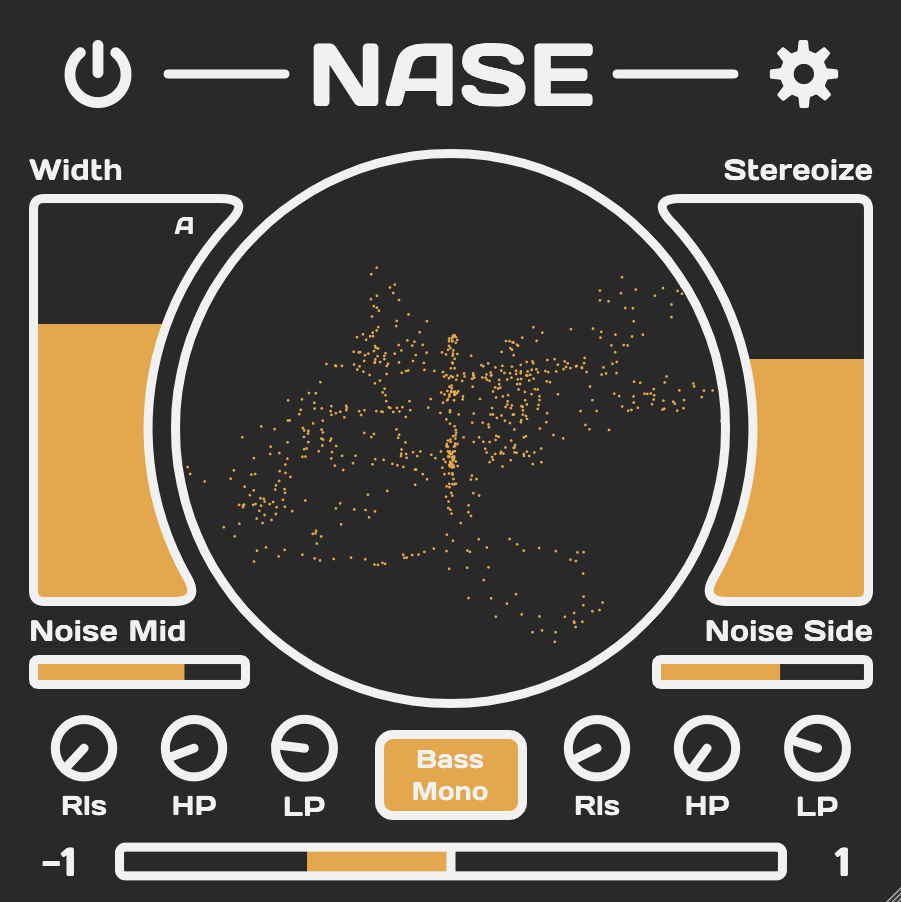
NASE is an easy-to-use stereo enhancer plugin with two separate noise modules for mid and side stereo information.
With just two main sliders, NASE makes day-to-day width control extremely easy. The Width slider controls the balance between your audio's mid and side information. Turn it up for a wide and down for a more narrow sound. Turn on automatic gain compensation to keep the overall volume from increasing when boosting the sides. The Stereoize slider makes even mono signals wider while not messing up your mix when played in mono.
The name NASE stands for Noise-Assisted Stereo Enhancer. With the two noise modules, you can add noise that dynamically follows your source audio's volume separately for the middle and sides. Each noise module has controls for release speed, low-pass filtering, and high-pass filtering. Adding noise to your sounds can make them sound wider and fuller.
Key Features:

Please log in to join the discussion
Submit: News, Plugins, Hosts & Apps | Advertise @ KVR | Developer Account | About KVR / Contact Us | Privacy Statement | Sell @ KVR | KVR Marketplace Terms & Conditions
© KVR Audio, Inc. 2000-2026

