1 KVR member has added Rewind to 1 MyKVR group 1 time.
Download KVR Studio Manager (FREE)
Rewind is a unique MSoundFactory instrument dedicated to the art of reverse sound. At its heart, a granular engine and a reverse tape loop work together to transform 128 included samples into something entirely new. Infused with a touch of Lo-Fi grit, Rewind can create a vast spectrum of sounds, from beautifully poetic chimes and nostalgic pads to mysterious, ominous textures perfect for scoring suspense.
{See video at top of page}
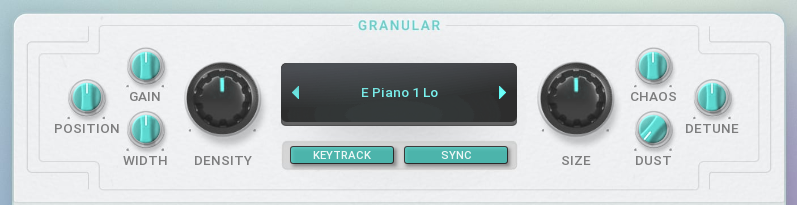
The core of Rewind is its powerful granular sampler. You can select one of the 128 sound sources as your starting point. The engine deconstructs the sample into tiny fragments called "grains" and plays them backwards. You have full control over this process with parameters like Position (where in the sample to start), Density (how many grains play at once), and Size (the length of each grain). Add stereo Width, introduce unpredictability with Chaos and Detune, or sprinkle in some vintage character with the Dust control for added crackle.
If you already have MSoundFactory or MSoundFactoryLE, Rewind is completely free to download. You just need to run MPluginManager and run it. However you can buy it separately, and use with the free version of MSoundFactory - MSoundFactory Player.
The Lo-Fi section adds character and imperfection with two simple knobs. The Digital control provides bit-crushing grit, while the Analog knob adds warmth, saturation, and subtle pitch instability. A dedicated switch places the Lo-Fi effect either Pre-Filter to be sculpted by the filter, or Post-Filter to affect the final sound.
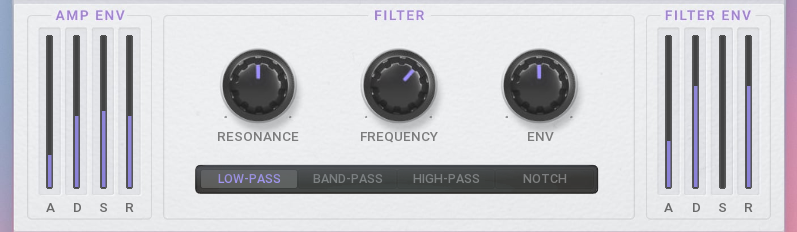
Shape your sound with a versatile multi-mode filter featuring Frequency and Resonance controls. Choose from Low-Pass, Band-Pass, High-Pass, and Notch modes to sculpt your tone. Two dedicated ADSR envelopes control the dynamics: the AMP ENV for overall volume and the FILTER ENV for modulating the cutoff, creating anything from sharp plucks to evolving pads.
This section emulates a classic reverse tape effect, capturing synced audio and playing it backwards. The Rewind knob controls the core character, while Half (octave down) and Double (octave up) knobs alter playback speed for rhythmic variations. Add authentic artifacts with Age (wear) and Wash (smear). The Regen control creates evolving feedback loops, while Fade ensures smooth transitions.
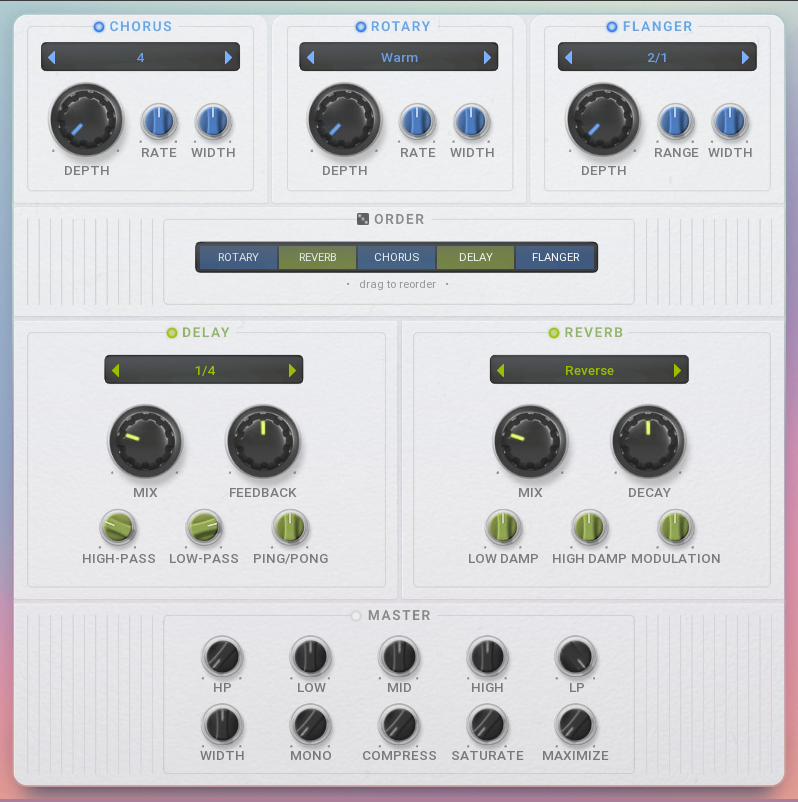
Rewind's effects suite includes five modules: a lush Chorus, swirling Rotary speaker, and a metallic Flanger, plus a tempo-synced Delay with filters and a spacious Reverb. The central Order panel is the main highlight, allowing you to drag and drop these modules into any sequence. This lets you easily create a custom effects chain for truly unique sound design possibilities. The Master section provides final polishing for a mix-ready sound. Sculpt your tone with a 3-band EQ and flanking High-Pass/Low-Pass filters, then adjust the stereo image with the Width and Mono controls. Add punch and warmth using the one-knob Compressor and Saturate effects, then boost the final loudness with the Maximize function.
For instant inspiration and quick adjustments, the Intro screen distils Rewind down to its three most essential controls. The large central Rewind knob controls the amount of the reverse tape loop effect. It's flanked by the Digital and Analog knobs, allowing you to quickly dial in character, from subtle warmth to heavy digital grit. You can also flick through all 128 sound sources directly from this screen. For complete sonic exploration, the dice icon at the bottom is a powerful randomiser; a single click will intelligently change every parameter across the entire instrument, instantly generating new and unexpected patches.

Please log in to join the discussion
Submit: News, Plugins, Hosts & Apps | Advertise @ KVR | Developer Account | About KVR / Contact Us | Privacy Statement | Sell @ KVR | KVR Marketplace Terms & Conditions
© KVR Audio, Inc. 2000-2026