Log InCreate An Account
  1. Plugins
  2. »
  3. TheZhe
  4. »
  5. TheExpressor
  6. »
  7. Details

TheExpressor

Dynamics (Compressor / Expander) Plugin by TheZhe
MyKVRFAVORITE23WANT25
TheExpressor
TheExpressor by TheZhe is a Virtual Effect Audio Plugin for macOS and Windows. It functions as an Audio Units Plugin and a VST 3 Plugin.

MyKVR: Groups, Versions, ...

106 KVR members have added TheExpressor to 70 MyKVR groups 125 times.

Download KVR Studio Manager (FREE)

Not In Your MY KVR Groups
(or group limitation prevents versioning)
+70 in private groups

KVR Rank

Overall: 6246   4951   5491

30-Day: 3832; 7-Day: 4321; Yesterday: 15148

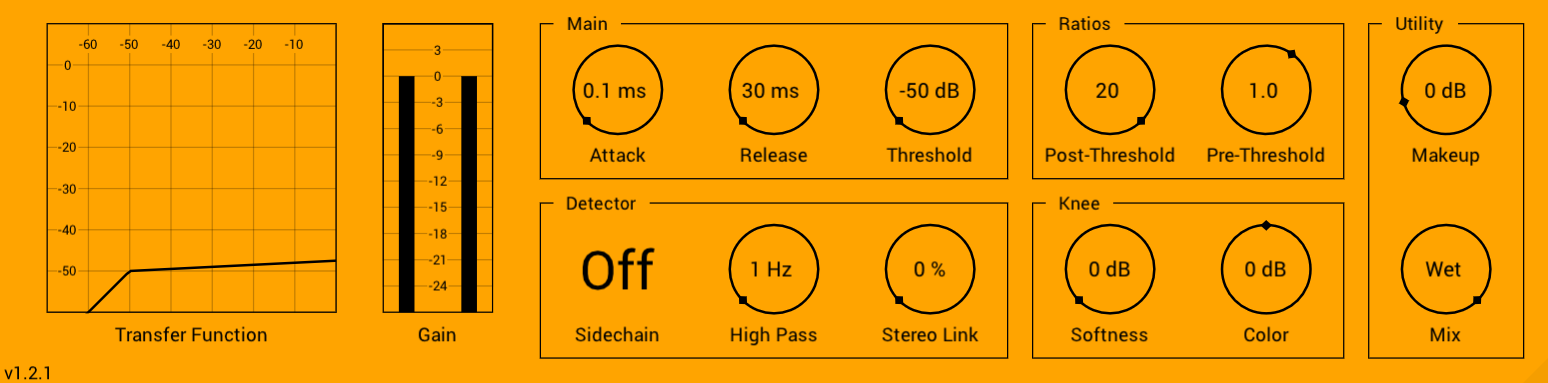
TheExpressor is a colored upwards/downwards (Ex)pander/Com(pressor).

Key Features:

  1. Color - change slightly to soften the knee or boost/cut up to 24 dB for extreme emphasis.
  2. Extremely Low Aliasing - better quality than 6x oversampled plugins without the oversampling overhead or any delay*.
  3. Bounded - output is at most 6 dB louder than the input when Makeup is 0 dB.
 *Backed by open-source research (github.com/thezhe/SOUL-VA). 

Buses:

Inputs:

  1. Main - input.
  2. Aux - sidechain input.

Outputs:

1. Output - output.

Parameters:

Attack (Main):

  • Description: Attack time.
  • Range 0.1 ms to 50 ms.
  • Default: 0.1 ms.

Release (Main):

  • Description: Release time.
  • Range 30 ms to 3.00 s.
  • Default: 30 ms.

Threshold (Main):

  • Description: Vertical location of the transfer function's knee.
  • Range -50 dB to 0 dB.
  • Default: -50 dB.

Post-Threshold (Ratios):

  • Description: Post-threshold ratio.
  • Range: 0.5 to 20.0.
  • Default: 20.

Pre-Threshold (Ratios):

  • Description: Pre-threshold ratio.
  • Range: 0.5 to 1.5.
  • Default: 1.

Makeup (Utility):

  • Description: Apply a volume to the wet signal.
  • Range: -6.0 dB to 50 dB.
  • Default: 0 dB.

Mix (Utility):

  • Description: Mix the dry and wet signals.
  • Range: 0 % dB to 100 %.
  • Default: Wet (100 %).

Sidechain (Detector)*:

  • Description: If set to On, the internal detector uses the sidechain signal.
  • Options: Off, On.
  • Default: Off.

High Pass (Detector):

  • Description: High-pass the detector's signal before calculating gain reduction.
  • Range: 1 Hz to 500 Hz.
  • Default: 1 Hz.

Stereo Link (Detector):

  • Description: Stereo-link the detector's signal directly after the high-pass.
  • Range: 0 % to 100 %.
  • Default: 0 %.

Softness (Knee):

  • Description: Set the width of the knee smoothing.
  • Range: 0 dB to 24 dB.
  • Default: 0 %.

Color (Knee):

  • Description: Add or subtract a bell-shaped curve to the knee.
  • Range: -24 dB to 24 dB.
  • Default: 0 dB.
 *Not suitable for modulation.

Latest User Reviews

Average user rating of 5.00 from 1 review
TheExpressor

Reviewed By Audion [all]
June 2nd, 2024
Version reviewed: 1.2.1 on Windows

A standout in free dynamics plugins. The only real competition is the venerable Waves C1. Unlike the C1, this unit allows for more colorful transfer functions. But no built in sidechain EQ or split band operation. There is enough difference between the two to justify using both.

Read Review

Products similar to TheExpressor...

Comments & Discussion for TheZhe TheExpressor

Discussion
Discussion: Active
kingozrecords
kingozrecords
10 February 2022 at 6:09pm

Thought I'd try this compressor. Small in file size. Did you use bluecat's?

TheZhe
TheZhe
13 February 2022 at 5:16am

Thanks! Wasn't aware of BlueCat's compressor. I guess you could say this is kinda of mix between that and ATK colored compressor plus some custom feautures.

JHEB
JHEB
25 February 2022 at 3:24pm

Great work adding the transfer function graph and meters! I would have written a new review on plugins4free, but sadly I can't give it more than the 5/5 stars I already have given it;) Thanks! //Jon B.

TheZhe
TheZhe
25 February 2022 at 8:38pm

Thanks Jon! Couldn't have done it without your feedback.

Please log in to join the discussion

Log In To KVR Audio
