Novation LaunchKey MK4 Review
![Nate [KVR]](https://www.kvraudio.com/forum/download/file.php?avatar=506958_1768372953.jpeg) By Nate [KVR] on
By Nate [KVR] on
Novation's LaunchKey series has long been a favorite among budget-conscious musicians and producers seeking reliable MIDI keyboard controllers. The recent MK4 refresh introduces some well thought out improvements and a fresh new design language, as well as offering a diverse range of models to cater to various needs. This includes the full-sized LaunchKey 49 and 61 with their semi-weighted keybeds and eight faders to the ultra-portable LaunchKey Mini 25 and 37 (on review here) which feature mini keybeds and two ribbon controls in lieu of the traditional pitch and mod wheels.
Unboxing and First Impressions
 The LaunchKey Mini 37 MK4 immediately impresses with its sleek and minimalist design, boasting a refined aesthetic that's both visually appealing and functional. The unit feels solid for its price point, with a well-constructed plastic body. Connectivity is a via the USB-C port, which handles both power and data transfer.
The front panel features a crisp OLED display and vibrant lighting for the 16 pads. The pads themselves are solid, offering a satisfyingly tactile response. There is very little flex or movement in the body when hammering down on the pads. The knobs, too, feel surprisingly premium for the price point, providing smooth and precise control over various parameters.
The keybed on the Mini 25 and 37, while understandably compact due to the mini key format, is still very much playable. It's worth noting that the Mini model we tested is not a keyboard designed for pianists or those seeking a weighted action. The keybed is a little springy, but for laying down chords, melodies, and ideas on the go, it's more than sufficient. The velocity curves for both the keys and pads might require some adjustment to suit individual preferences, as the initial response can feel somewhat polarized between soft and loud.
Ergonomically, the LaunchKey Mini 37 excels as a portable instrument. Its low profile and compact dimensions make it incredibly easy to slip into a backpack or laptop bag. The absence of traditional pitch and mod wheels further reduces its profile, with only the bank of eight knobs protruding slightly from the top panel. The newly introduced 37-key version in particular strikes an excellent balance between size and playability, offering an extra octave of keys compared to its smaller sibling and is comes in just slightly larger than a full sized computer keyboard with a numpad.

Seamless Setup
Getting started with the LaunchKey Mini 37 is a breeze. For the most part, it’s a plug and play experience. Windows users may opt to install the MIDI driver, but it was only necessary to allow the MIDI ports to be shared by applications or to set up custom controls without the need to exit your DAW.
The setup, registration and installation of the included software is done almost entirely in your browser of choice. The web-based nature of Novation's excellent Components software is a welcome innovation, eliminating the need for additional desktop applications. Of course, a downloadable version is available for those who prefer it.
DAW Integration
 While Novation has historically catered to Ableton Live users, the MK4 series' DAW integration extends its appeal to other platforms. It comes with scripts for most DAW's including Logic, Cubase and FL Studio, but we were particularly particularly impressed with the experience in Bitwig. While traditionally, for some controllers at least, you may have needed to rely on third party scripts such as the excellent 'Driven by Moss' to get the most out of your gear, the LaunchKey MK4 is one of the best native implementations we've come across.
The sequencer functionality, previously exclusive to Ableton Live, works flawlessly within Bitwig. Dedicated control banks and modes are easily accessible via the shift key and the two layers of pads. A quick press of the "shift" key and "DAW" pad activates clip mode. Hit it again and you'll be in the Sequencer mode. The sequencer automatically creates a clip and dynamically adjusts clip length based on the last note entered, making it incredibly intuitive. Drum sequencing is a breeze, with the ability to select drum pads directly from the keyboard. For instruments, simply hold down a key to set the pitch, or indeed entire chords, while inputting notes into the sequencer.
The LaunchKey Mini 37 sequencer mode goes beyond basic note input too, offering in-depth control over note length, velocity, timing offsets, and even note repeats for ratcheting effects and drum rolls. These parameters can be fine-tuned by holding a pad and adjusting the corresponding knobs. The entire sequencing process feels fluid and inspiring, making it a joy to create music on the fly. One feature however we'd like to see is the ability to flip the clip layout to a horizontal orientation which would perhaps align better with Bitwig's arranger workflow.
Customization and Control
 The LaunchKey Mini 37's versatility extends to its custom controller modes. Thankfully, they have left this range of controllers open ended and highly customizable, allowing users to define and create custom maps within the Novation Components app. Numerous templates are available, offering direct control over various hardware and software synthesizers. Creating custom mappings from scratch is quick and intuitive too. The addition of keystroke support alongside traditional CC and NRPN values opens up new possibilities for triggering DAW specific functions or macros via the pad controls. The mod wheel can also be permanently re-assigned via the Components app. This was a really nice touch as the touch strip feels less useful as a mod wheel at times on the LaunchKey Mini controllers, and repurposing it to function as an additional ‘fader’ control makes a lot of sense.
Hardware Features
A MIDI output is available via a 3.5mm jack on the Mini versions of the LaunchKey (traditional 5 pin for the bigger models) making it perfectly viable for driving external hardware. The now seemingly obligatory arpeggiator, scale and chord functions are all present and excellently implemented, especially the custom chord mode whereby you can play your own chords and assign them to pads. There is a neat function whereby any chord played will be shown on the OLED display. The arpeggiator has some nifty generative capabilities too that can be accessed via the knobs whilst active. Levels of complexity can be added to both chords and arpeggiator patterns via the exploration and mutate parameters and both can be quite inspiring to play with.
Bundled Software
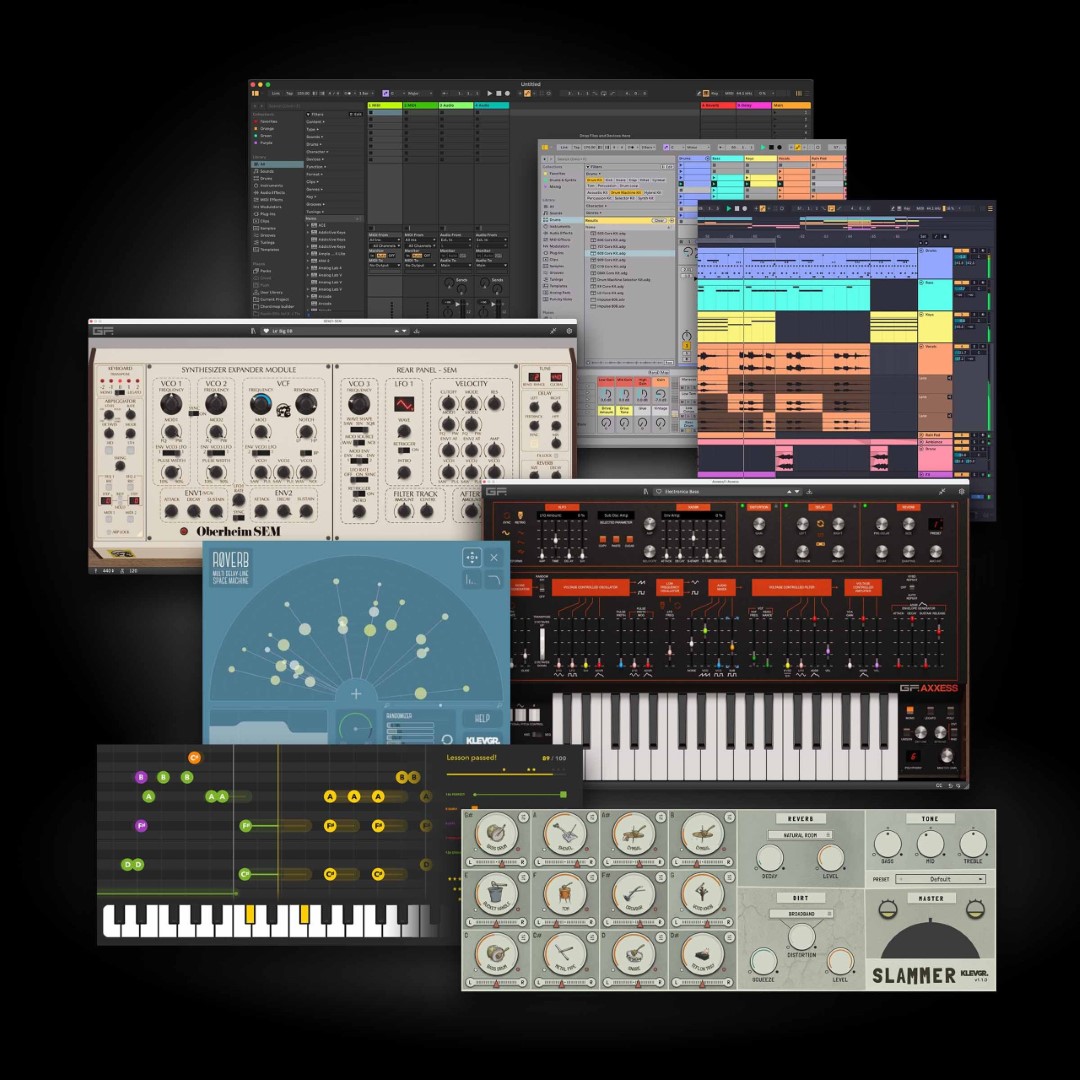 The included software rounds out the entire package, offering a range of tools for both mixing, writing and playing. It’s no surprise you’ll get a copy of Ableton Live 12 Lite here, along with a selection of plugins from Klevgrand, including LUXE, R0Verb and Slammer. The highlight is probably the inclusion of a bundle of synths from GForce, including the Oberheim SEM, OB-EZ and AXXESS. Orchestral Tools has also partnered with Novation bringing user the exclusive Parallel Orchestra Bundle featuring featuring a piano, strings, percussion, woodwinds, orchestral textures and more. Lastly, Melodics includes guided lessons for both beginners and advanced users.
Conclusions
The entire LaunchKey range offers up a range of really well thought out, refined controllers. There is a size to suit everyone, be it a full size master controller, or something to throw in your backpack to sketch a few ideas whilst on the road. They are very reasonably priced too considering the build and feature set, making them a great addition to any budget conscious producer’s set up as well as pro’s looking for a solid controller for the road. Although these will be right at home driving both hardware, iOS or mobile apps, and other DAW’s like Logic, Cubase and FL Studio, if you are an Ableton or Bitwig user in particular, these should absolutely be on your list to check out.
Pros
- Affordable pricing.
- Pads and knobs feel great, even on the Mini versions.
- Aesthetically pleasing with clean, minimalist design and crisp OLED display.
- DAW integration is top notch, particularly for Ableton and Bitwig
- Highly customisable via Novation Components app.
- Wide range of options from the ultra portable Mini to the semi-weighted LaunchKey 61.
Cons
- The LaunchKey Mini keybed is a little springy, but to be expected for a controller of this size.
Availability and Pricing:
The KeyLab mk3 is available in 6 different variants from Novation, Sweetwater and Thomann.
- LaunchKey Mini 25 MK4: $139.99
- LaunchKey Mini 37 MK4: $169.99
- LaunchKey 25 MK4: $209.99
- LaunchKey 37 MK4: $239.99
- LaunchKey 49 MK4: $289.99
- LaunchKey 61 MK4: $339.99
Read More Review

Discussion
Please log in to join the discussion