



 ZonderP Productions has announced the release of VeeSTeeExtifier, a utility application for Windows which makes updating existing VeeSTeeEx wrappers to a newer version much easier.
Let the application scan your plugin directory for instances of the VeeSTeeEx wrapper. Found VeeSTeeEx wrappers will be added to a list and marked for update, in case they have a lower version than the one you would like to update to. Then with one click, all the checked VeeSTeeEx wrappers in the list will be updated to the new version in seconds.
VeeSTeeExtifier is only necessary for users who already have wrapped at least a few VST2.
Updates to VeeSTeeEx
Additionally, VeeSTeeEx has been updated to version 1.4.1.
VeeSTeeEx is a free Windows only wrapper for VST 2 plugins which adds a preset management system and more to the wrapped plugin.
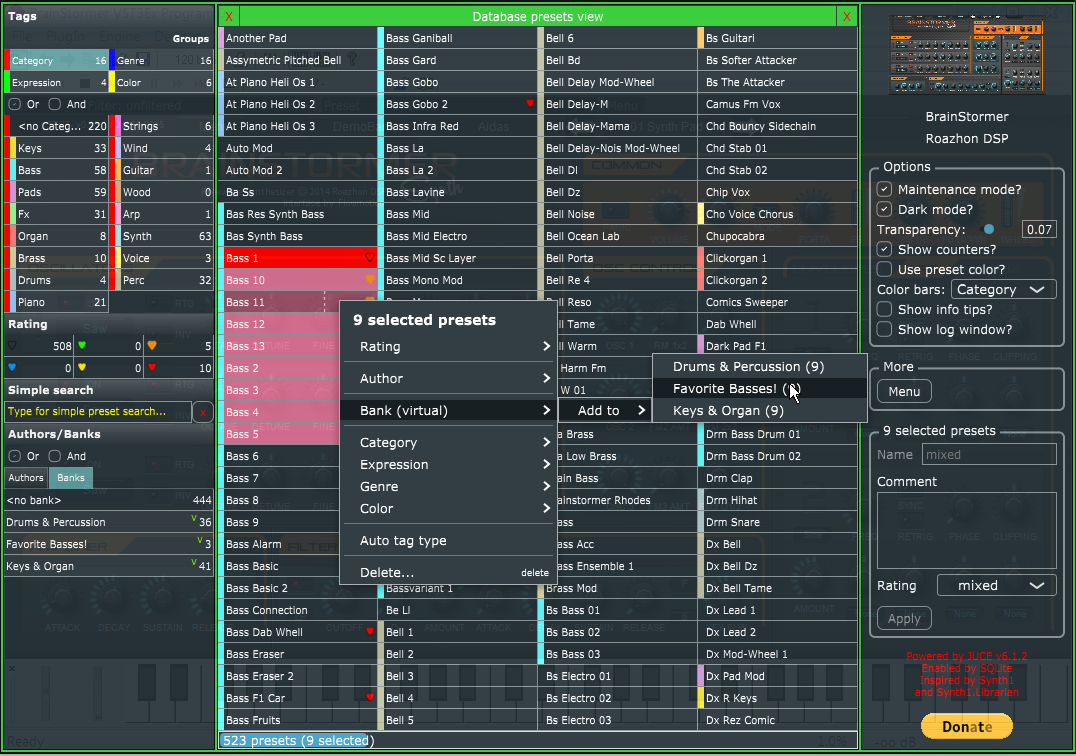
Presets can be imported to a presets database from which they then can be quickly selected for usage within the wrapped plugin.
There is tagging by some built-in tag groups and tags, but is is also possible to define own tag groups and tags. Banks and presets can also be assigned to an author, and there is the possibility to rate presets and quickly find them by name with a simple search. This tagging/rating/searching can be used in combination with search filtering options.
This is a maintenance release and doesn't come with new features. The most important improvements and fixes include:
- Proper handling of parameter changes.
Now a host/DAW should recognize a change of state of a wrapped VST2 plugin in case any automatable parameter changed. - Improved display of rating on Pilot's filter display in case more than one rating is selected in the filter.
- Fixed a bug where comment and rating were not saved when a new virtual bank got created.
- Fixed a bug where rating was not saved when a new author got created.
- Fixed a bug where the 'banks' counter on the 'Author' tab didn't get updated accordingly when an author was added to a bank.
- Improved auto-detection of color to use as background color for the Pilot based on the 'main' color of the wrapped VST2 plugin.
You may try to delete the GUI file of a VeeSTeeEx wrapper and then open the GUI file again in case you have the feeling that the Pilot's background color isn't what it should be for a given wrapped VST2 plugin. Do so only, if you didn't manually edit the GUI xml file to make some adjustments. Those changes would then be lost.
This procedure may, but also may not, result in a better suitable background color for the Pilot. - Improved behavior/usability of quick save and quick import of internal presets for 'badly' written VST2 plugins which don't report back the name of the current preset.

