
483 KVR members have added GR-8 to 359 MyKVR groups 571 times.
Download KVR Studio Manager (FREE)
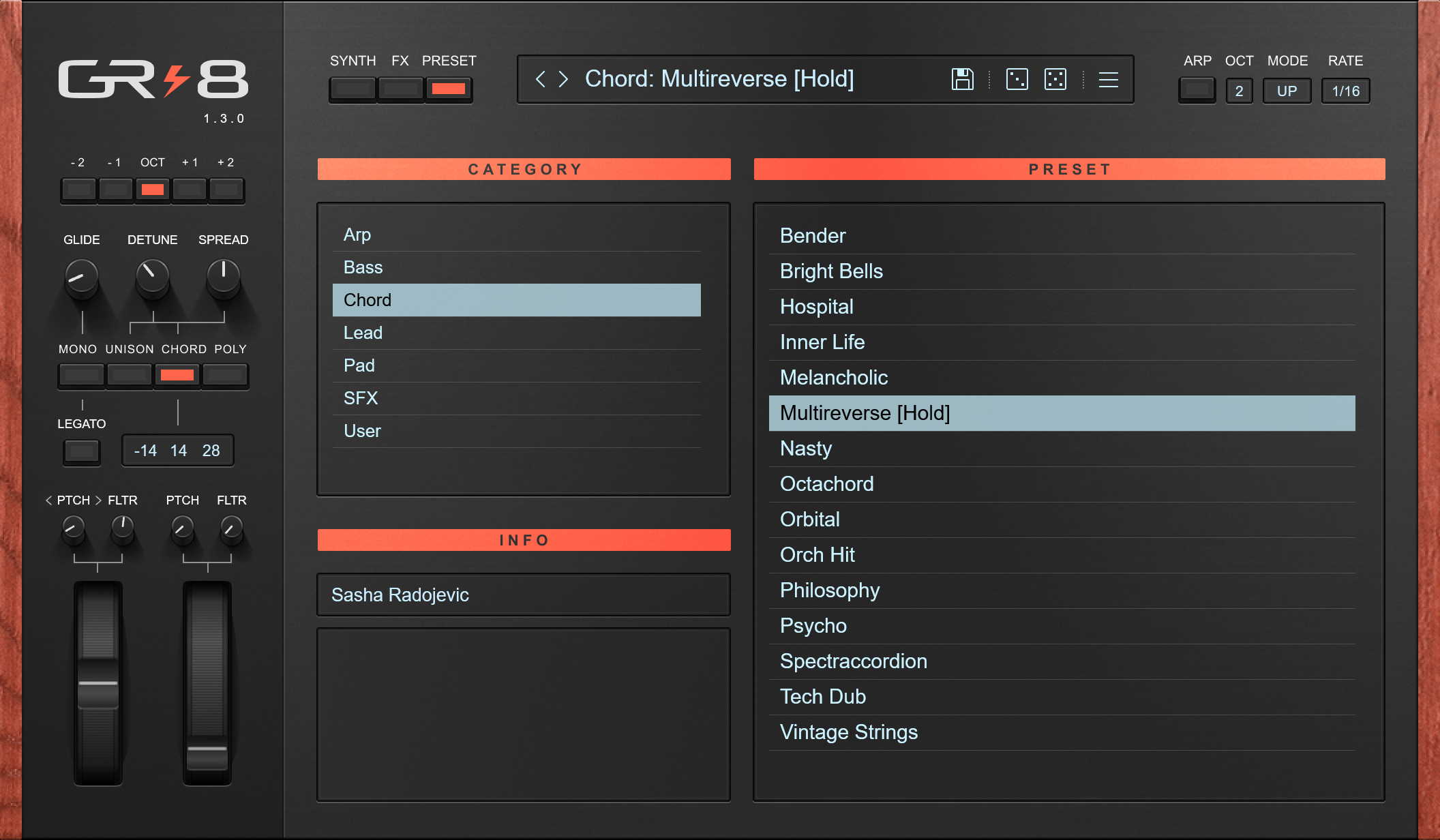
GR-8 is an 8 voices virtual analog synthesizer with built-in effects and an arpeggiator.
Features:
Change Log.
v1.3.0 - 2024-12-08:
Added:
Updated:
Removed:
v1.2.0 - 2021-10-08:
Important: Parameter automation IDs are changed in version 1.2.0. That breaks automation compatibility with previous versions. If you open an old song that had automated (for instance) Filter Cutoff, that automation lane will now automate some other parameter i.e. Envelope Attack. The change is a fix for a mistake that I made by adding new controls in versions 1.1.0 and 1.1.1. Due to my inexperience with newer versions of the plugin development platform that I use, I didn't know automation parameter IDs are automatically set in alphabetical order unless manually specified. My sincerest apologies to everyone whose work is affected by the change. On the brighter side, presets are not affected by this change, so your old presets will sound the same as before.
Caution: Each preset has its own MIDI assignment. If you make a MIDI assignment you need to save the preset. Otherwise, the MIDI assignment you've made will be lost as soon you change the preset. If you want to make your own presets with the same MIDI assignments, you can do it by assigning MIDI controls to the Initial preset, saving a copy of it, and using it as a template for your sounds.
v1.1.1 - 2021-09-25:
v1.1.0 - 2021-09-22:
v1.0.7 - 2021-07-27:
v1.0.6 - 2021-07-24:
v1.0.5 - 2021-07-24:
v1.0.4 - 2021-07-22:
v1.0.3 - 2021-07-19:
v1.0.2 - 2021-07-18:
v1.0.1 - 2021-07-04:

Another Incredible synth (which i just discover) Amazing, Marvelous,
No Words are enough to describe his enormous potential... there is here some real Big Fat Sounds.
Thank you a lot to the creator(s).
Update: The installer was replaced with a vst3 version. It's all good now! Grate sounding synth.
Reviewed By SynthasaurusRex [all]
October 29th, 2023
Version reviewed: 1.2.0 on Windows
Great introductory synth, and more. Very good modeling of a fixed architecture synth. Good, clean sound.
Reviewed By Trader One [all]
January 10th, 2022
Version reviewed: 1.2.0 on Windows
Its one of best synths in "simple" category. It feels and sounds like HW synth from 80s for example Polysix. Sound is very good, I would not guess it is VST from blind listening. Good sound for commercial grade songs, nice unison.
It has good sounding effect unit with analyser and score, it would be good to have it as separate VST.
This one is a good one. I have a lot of fun with it.
It needs a little time to find wich knob modulates what (like the LFO)...i realy was trying to modify the Theme then, .
but thats maybe a fun for later. Straight forward Design, Clean sound, that Chord Thing holy Cow is awesome.
I realy like the possibillity to modify what happens when u release the key...thats so cool. But i think its a basic Synthesizer thing right? Anyways...
And you have a two-click random Option thats very nice. Random is key.
What I want to see:
All at One - Another Awesome Free Plugin i highly recommend. And i hope for some further Versions or another better Synth by "Phuturetone"
Thank you Sir .
 $149.00Jup-8 V 4$149.00Synthi V
 $169.00Repro$149.00Prophet-5 V
THIS POST HAS BEEN REMOVED
THIS POST HAS BEEN REMOVED
THIS POST HAS BEEN REMOVED
THIS POST HAS BEEN REMOVED
THIS POST HAS BEEN REMOVED
THIS POST HAS BEEN REMOVED
THIS POST HAS BEEN REMOVED
THIS POST HAS BEEN REMOVED
THIS POST HAS BEEN REMOVED
THIS POST HAS BEEN REMOVED
THIS POST HAS BEEN REMOVED
THIS POST HAS BEEN REMOVED
THIS POST HAS BEEN REMOVED
THIS POST HAS BEEN REMOVED
THIS POST HAS BEEN REMOVED
THIS POST HAS BEEN REMOVED
THIS POST HAS BEEN REMOVED
THIS POST HAS BEEN REMOVED
THIS POST HAS BEEN REMOVED
THIS POST HAS BEEN REMOVED
THIS POST HAS BEEN REMOVED
THIS POST HAS BEEN REMOVED
THIS POST HAS BEEN REMOVED
THIS POST HAS BEEN REMOVED
THIS POST HAS BEEN REMOVED
THIS POST HAS BEEN REMOVED
THIS POST HAS BEEN REMOVED
THIS POST HAS BEEN REMOVED
THIS POST HAS BEEN REMOVED
THIS POST HAS BEEN REMOVED
THIS POST HAS BEEN REMOVED
THIS POST HAS BEEN REMOVED
THIS POST HAS BEEN REMOVED
THIS POST HAS BEEN REMOVED
THIS POST HAS BEEN REMOVED
THIS POST HAS BEEN REMOVED
THIS POST HAS BEEN REMOVED
THIS POST HAS BEEN REMOVED
THIS POST HAS BEEN REMOVED
THIS POST HAS BEEN REMOVED
THIS POST HAS BEEN REMOVED
THIS POST HAS BEEN REMOVED
THIS POST HAS BEEN REMOVED
THIS POST HAS BEEN REMOVED
THIS POST HAS BEEN REMOVED
THIS POST HAS BEEN REMOVED
THIS POST HAS BEEN REMOVED
THIS POST HAS BEEN REMOVED
THIS POST HAS BEEN REMOVED
THIS POST HAS BEEN REMOVED
THIS POST HAS BEEN REMOVED
THIS POST HAS BEEN REMOVED
THIS POST HAS BEEN REMOVED
THIS POST HAS BEEN REMOVED
THIS POST HAS BEEN REMOVED
THIS POST HAS BEEN REMOVED
THIS POST HAS BEEN REMOVED
THIS POST HAS BEEN REMOVED
THIS POST HAS BEEN REMOVED
THIS POST HAS BEEN REMOVED
THIS POST HAS BEEN REMOVED
THIS POST HAS BEEN REMOVED
THIS POST HAS BEEN REMOVED
THIS POST HAS BEEN REMOVED
THIS POST HAS BEEN REMOVED
THIS POST HAS BEEN REMOVED
THIS POST HAS BEEN REMOVED
THIS POST HAS BEEN REMOVED
THIS POST HAS BEEN REMOVED
THIS POST HAS BEEN REMOVED
THIS POST HAS BEEN REMOVED
THIS POST HAS BEEN REMOVED
THIS POST HAS BEEN REMOVED
THIS POST HAS BEEN REMOVED
THIS POST HAS BEEN REMOVED
THIS POST HAS BEEN REMOVED
THIS POST HAS BEEN REMOVED
THIS POST HAS BEEN REMOVED
THIS POST HAS BEEN REMOVED
THIS POST HAS BEEN REMOVED
THIS POST HAS BEEN REMOVED
THIS POST HAS BEEN REMOVED
THIS POST HAS BEEN REMOVED
THIS POST HAS BEEN REMOVED
THIS POST HAS BEEN REMOVED
THIS POST HAS BEEN REMOVED
THIS POST HAS BEEN REMOVED
THIS POST HAS BEEN REMOVED
THIS POST HAS BEEN REMOVED
THIS POST HAS BEEN REMOVED
THIS POST HAS BEEN REMOVED

Dear GR-8 users, I've removed all the previous comments since they were related to previous versions of the GR-8 and not relevant anymore. Feel free to add new comments! :).
I have a simple question:
Where do I put presets on a Mac?
(Both User and System) Library/ Application Support/PG-8X does not work.
Thanks for any help.
User/Library/Audio/Presets/Phuturetone/GR-8.
Cheers.
Is it only me, that with version 1.3.0 the GUI doesn't anymore display correctly?
All worked fine up to version 1.2.0, but now the GUI is only halfway there.
I can start an instance of GR-8 v1.3.0 and also open the GUI, but only a bare GUI is displayed, missing a lot of the more fancy elements.
I see the 'Synth' GUI and if I click on 'FX' or 'PRESET', the according pages won't show.
Also all the knobs are missing the 'pointer' to the actual position, and the preset display field is empty.
And also all the labels are missing except the ones for the sections. So 'OSC 1', 'PMW', 'FILTER' and so on is there, but not so the labels for the knobs etc.
I'm on Windows 7.
Hmmm, seems a Windows 7 issue.
I managed to run a Windows 10 22H2 in VirtualBox on my Windows 7 machine and there GR-8 GUI displays as it should.
Is Windows 7 generally not anymore supported by GR-8?
Or is it just that I would need to upgrade/install some component or so on my Windows 7 machine to make it work on it?
Any advice?
Thanks.
Hi Zonder, Win 7 is no longer supported, I think that Win 8.1 is minimum. Not my choice, just following the "progress".
Thanks for your answer.
Yeah, I understand this.
Maybe you could mention somewhere the requirements for GR-8?
This might save some time for some users.
Nonetheless a big 'Thank you' for GR-8.
I agree, I should have mentioned that in the Change Log, so it is more visible. I've completely forgot about it being a change.
I've written system requirements here, right side bar, beside OS icons. But they are hidden, a user has to expand that info by clicking on the "Sys Req" button.
It would be nice to still supply the older version for those who need to reload older projects on older machines. Either as a separate download or inside the main distribution file. I know it's not ideal, but what is?
THIS POST HAS BEEN REMOVED
Download and install:
https://aka.ms/vs/17/release/vc_redist.x64.exe
Save GR-8.vst to:
C:/Program Files/Common Files/VST3.
If that doesn't work, ask for help on FL Studio forum.
FuzzshiCore, sorry! I've deleted your message by accident.
THIS POST HAS BEEN REMOVED
Hello, Any idea why I might be having some issues with Cubase seeing the GR-8 plugin? It's the only plugin in the C:\Program Files\Common Files\VST3 that cannot be seen by Cubase. I've tried several things including renaming the folder, changing the folder structure, and renaming plugin itself and so far nothing has gotten Cubase to recognize it. Everything else in that folder, including the Steinberg plugins which are structured in the same was as the GR-8.vst3 folder, is detected by Cubase.
Your Windows is probably missing the C++ Library for apps made in Microsoft Visual Studio:
https://aka.ms/vs/17/release/vc_redist.x64.exe.
Aha, that's what it was! I had run that last night but never restarted. After a restart, Cubase has found GR-8! Thank you so much.
Awesome, I'm glad you made it work. :).
lo descargue pero no tiene el instalador -- que puedo hacer ?
Just follow the instructions from the How to Install.txt
Please log in to join the discussion
Submit: News, Plugins, Hosts & Apps | Advertise @ KVR | Developer Account | About KVR / Contact Us | Privacy Statement | Sell @ KVR | KVR Marketplace Terms & Conditions
© KVR Audio, Inc. 2000-2026