
0 KVR members have added E-DynamicEQ300 to 0 MyKVR groups 0 times.
Download KVR Studio Manager (FREE)
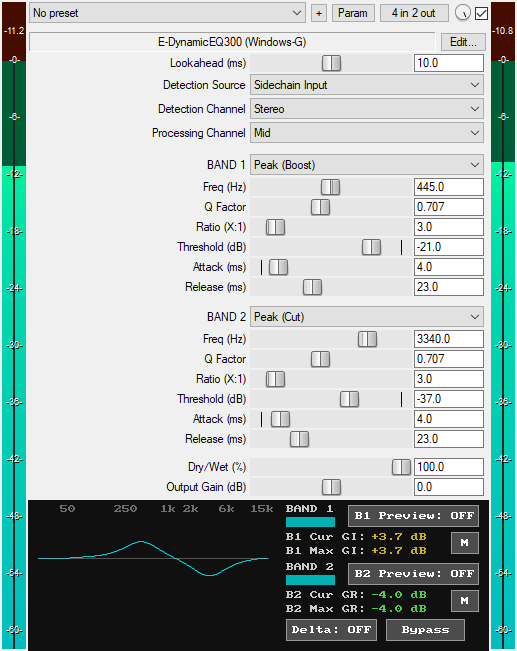
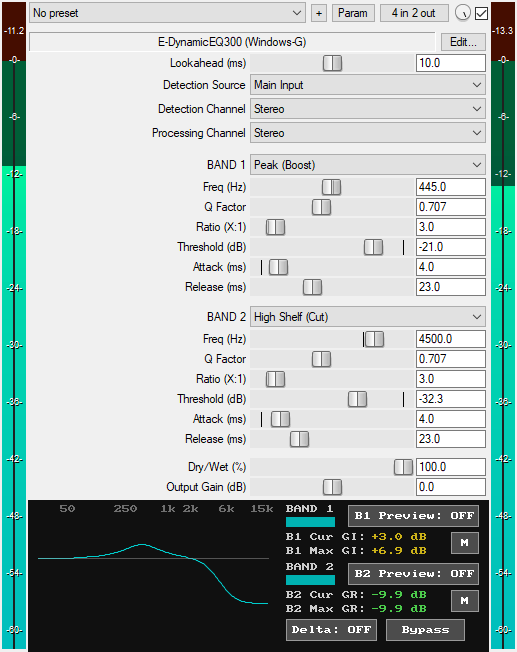
A JSFX 2-band dynamic equalizer plugin for REAPER that offers:
* Two Filter Bands:
1. Band 1: Can be set to Off, Low Shelf (Cut), Low Shelf (Boost), Peak (Cut), or Peak (Boost).
2. Band 2: Can be set to Off, Peak (Cut), Peak (Boost), High Shelf (Cut), or High Shelf (Boost).
* Lookahead (0 ms to 20 ms): Controls the lookahead time of the dynamic EQ in milliseconds. Lookahead delays the main track's audio slightly to let the EQ analyze the audio ahead of time before the transients arrive. This ensures that the first milliseconds of transients are preserved and not chopped off. This is great for preserving the attack of percussive sounds. The latency it introduces is reported to the DAW for automatic delay compensation. Turn lookahead off by setting the control to 0 ms.
* Two Detection Source Modes:
1. Main Input: The dynamic EQ uses the main track's audio for both detection and dynamic processing.
2. Sidechain Input: The dynamic EQ listens to external sidechain input for detection while applying dynamic equalization to the filter bands of the main track's audio.
* Five Detection Channel Modes:
1. Stereo: Makes the dynamic EQ react to the loudest of the left and right channels.
2. Mid: Makes the dynamic EQ react only to the levels of the mid signal.
3. Side: Makes the dynamic EQ react only to the levels of the side signal.
4. Left Only: Makes the dynamic EQ react only to the signal levels of the left channel.
5. Right Only: Makes the dynamic EQ react only to the signal levels of the right channel.
* Five Processing Channel Modes:
1. Stereo: Applies dynamic equalization equally to both left and right channels.
2. Mid: Applies dynamic equalization only to the mid component of the main track's audio.
3. Side: Applies dynamic equalization only to the side component of the main track's audio.
4. Left Only: Applies dynamic equalization only to the left channel of the main track's audio, leaving the right channel unaffected.
5. Right Only: Applies dynamic equalization only to the right channel of the main track's audio, leaving the left channel unaffected.
* Frequency (10 Hz to 21 kHz): Sets the center or cutoff frequency of the filter for each band.
* Q Factor (0.1 to 10): Controls the resonance of the filter for each band.
* Ratio (1:1 to 20:1): Controls how much dynamic gain reduction or gain increase is applied to the active band. In Cut mode, controls how much gain reduction is applied to signals above the threshold. In Boost mode, controls how much gain increase is applied to signals above the threshold. A ratio of 1.0:1 provides no dynamic processing, while higher ratios produce more pronounced dynamic gain changes.
* Threshold (-100 dB to 0 dB): Determines when dynamic equalization occurs for each band. In Cut mode, the signals above this threshold are reduced in level based on the ratio. In Boost mode, the signals above this threshold are increased in level based on the ratio.
* Attack (1 ms to 500 ms): Controls how fast each band responds when the detected signal exceeds the threshold. In Cut mode, it controls how fast the dynamic EQ reduces gain when the detected signal exceeds the threshold. In Boost mode, it controls how fast the dynamic EQ increases gain when the detected signal exceeds the threshold. Fast attack times (1 ms to 14 ms) allow the dynamic EQ to respond quickly, medium attack times (15 ms to 34 ms) provide a middle ground between fast and slow response, while slower attack times (35 ms to 500 ms) allow the dynamic EQ to engage slowly.
* Release (1 ms to 2000 ms): Controls how fast each band's gain change returns to unity after the detected signal drops below the threshold. In Cut mode, it controls how fast the gain reduction returns to unity after the detected signal drops below the threshold. In Boost mode, it controls how fast the increased gain returns to unity after the detected signal drops below the threshold. Fast release (1 ms to 14 ms) creates quick recovery, while slow release (70 ms to 2000 ms) makes the gain reduction/increase return toward unity at a slow pace. Medium release (15 ms to 69 ms) provides a middle ground between fast and gradual recovery.
* Dry/Wet Mix (0% to 100%): Controls the mix between the original (dry) signal and the dynamically equalized (wet) signal, ranging from 0% (fully dry) to 100% (fully wet). This is useful for parallel dynamic equalization.
* Output Gain (dB): Sets the final output level of the plugin from -30 dB to +30 dB to compensate for volume changes.
* GUI EQ Curve Display: Displays a real-time frequency response curve of the filter bands as they respond dynamically to the incoming signal.
* GUI Band Status Indicators: Show the active/inactive status of each filter band.
* GUI B1 Preview Button: When turned ON, it solos the exact frequency region of the detection signal being used to trigger Band 1's dynamic processing.
* GUI B2 Preview Button: When turned ON, it solos the exact frequency region of the detection signal being used to trigger Band 2's dynamic processing.
* GUI "M" Buttons: Smooth mute buttons that when turned ON, mute or bypass their respective filter bands without audio clicks. Available for automation as "Band 1 Mute" and "Band 2 Mute" in the plugin's parameter list.
* GUI Cur GR/GI Readouts (dB): Display the current amount of gain reduction or gain increase being applied to each filter band.
* GUI Max GR/GI Readouts (dB): Display the maximum gain reduction or gain increase applied to each filter band since playback started. The values automatically reset on each playback start and when each band's parameters or the dry/wet control change.
* GUI Delta Button: Solos the difference between the wet and dry signals. Based on the gain direction of each band, it lets you hear what the dynamic EQ boosted or removed from the main signal. This is very useful when adjusting settings. It is available for automation as "Delta (Smooth)" in the plugin's parameter list.
* GUI Bypass Button: A smooth bypass button for toggling the dynamic EQ effect on or off without audio clicks. Available for automation as "Bypass (Smooth)" in the plugin's parameter list.
* Zipper-Noise-Free Operation: Advanced interpolation ensures no zipper noise during slider automation or real-time adjustments.
* Minimal CPU Usage.
You can grab it for $14. All future updates are free, just make sure to use a valid email so I can send future updates to you.
Listen to the audio demo here or on the Gumroad product page to hear what the plugin can do.
Email Support: info.windowsg@gmail.com
====================================
Using This JSFX Plugin in Other DAWs:
If you want to use this JSFX plugin in other DAWs, you can do so using the open-source YSFX plugin.
YSFX is available in VST3, AU, and CLAP formats for Windows, macOS, and Linux.
Download your preferred version of YSFX from here (Click on "Assets" for the downloads to appear):
https://github.com/JoepVanlier/ysfx/releases
YSFX comes in two versions:
* ysfx-s FX (for JSFX effects).
* ysfx-s instrument (for JSFX instruments).
1. Open ysfx-s FX in your DAW,
2. Then click "Load", find your "E-DynamicEQ300_Windows-G" file, and click "Open."
The JSFX plugin will now run inside the YSFX host, working perfectly in any DAW that supports VST3, AU, or CLAP plugins.

Please log in to join the discussion
Submit: News, Plugins, Hosts & Apps | Advertise @ KVR | Developer Account | About KVR / Contact Us | Privacy Statement | Sell @ KVR | KVR Marketplace Terms & Conditions
© KVR Audio, Inc. 2000-2026

