4 KVR members have added GeoShred Pro to 5 MyKVR groups 6 times.
Download KVR Studio Manager (FREE)
GeoShred Pro Version 7.
With in-app purchases for GeoSWAM and Naada instruments on devices running iOS 13 or later.
Imagine a new kind of musical instrument, an instrument that lets performers fluidly express multiple independent voices. An instrument with continuous pitch control that also helps players precisely land on the right note in any temperament.
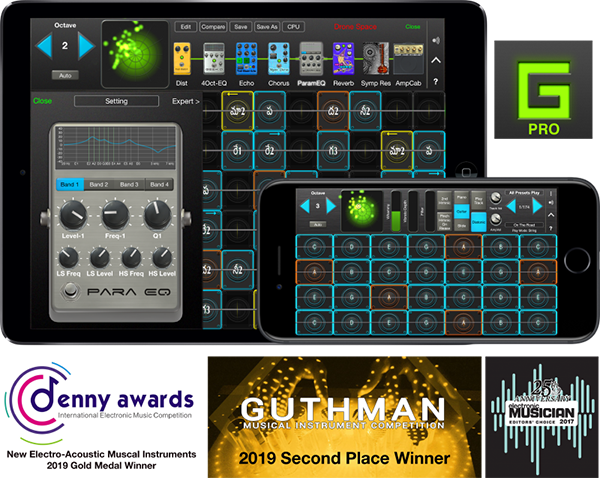
GeoShred Pro is an award-winning, deeply expressive musical instrument for multi-touch devices.
Its innovative performance surface features "almost magic" pitch-rounding algorithms and is coupled to physically modeled instruments and effects. GeoShred Pro also supports AUv3, MIDI In/Out, MPE, and 3D Touch. It combines Jordan Rudess' groundbreaking performance concepts with powerful physically modeled guitar and effects technology based on the research of Dr. Julius O. Smith III of Stanford/CCRMA. GeoShred's expressive control surface can also be used to play external synthesizers.
300,000 artists in over 120 countries perform with GeoShred, with a strong global community that includes many musicians in India.
Awards include:
• 2nd Place Winner, 2022/2025 MIDI Innovation Award for Software
• Gold Medal Winner, 2019 Denny Award
• Winner, 2019 Guthman New Musical Instrument Award
• Winner, 2017 Electronic Musician Editor's Choice Award.
GeoShred Pro Version 7 Features.
• Send/Connect support so GeoShred for iOS/iPadOS can control GeoShred Studio for macOS
• A fluid, expressive playing surface with finger vibrato, slide, and intelligent pitch rounding
• Built-in physically modeled guitar
• Physically modeled effects including Distortion, Wah, EQ, VCF, Flanger, Phaser, Chorus, Tremolo, Reverb, Sympathetic Resonator, Echo Looper, Multi-Tap Echo, Amp and Cabinet Modeling, Modeled Feedback for Guitar, and VCF effects
• In-app purchases for 22 Naada instruments: Bansuri, Bass, Bass Clarinet, Carnatic Violin, Cello, Dizi, Duduk, Erhu, Gaohu, Guan, Nadaswaram, Pan Flute, Pipa, Rudra Veena, Sarangi, Saraswati Veena, Sarod, Shehnai, Sitar, Suona, Viola, and Zhonghu
• In-app purchases for 11 GeoSWAM instruments: GeoViolin, GeoFlute, GeoTenorSax, GeoCello, GeoClarinet, GeoOboe, GeoTrumpet, GeoBassTrombone, GeoBassFlute, GeoViola, and GeoPizzBass
• AUv3 plug-in support with parameter automation
• iCloud preset synchronization
• MIDI/MPE In/Out support
• MIDI configuration presets
• Customizable control surface mapping to physical MIDI controls
• Diatonic keyboard mode, where every key is in the scale
• Support for world scales and temperaments, including Indian ragas, Arabic scales, and Balinese scales
• 3D Touch support on compatible iPhones
• Backing tracks
• Built-in arpeggiator
• Easy preset sharing via email or iCloud.
The GeoSWAM and Naada instruments can be performed from the GeoShred keyboard, MPE controllers, conventional MIDI controllers, and wind controllers.
Praise for the GeoShred family of apps:
GeoShred is brilliant- it's a real instrument."
Eddie Jobson.
A fantastic new invention which is going to revolutionize the way music is played, expressed and learned! "GeoShred" is one of the foremost best musical inventions I've had the pleasure to experience in recent years. Definitely 5 stars out of 5! GIGANTASTIVISSIMO.....R...A...Z !!!!!"
Patrick Moraz.
That's just nuts. You're [Jordan] the best-guitarist-without-a-guitar of all time.
Joe Satriani.
GeoShred is a breakthrough [musical instrument] for the iPad. Some might think it's the best evidence yet that there has indeed been reverse engineering of alien technology, but if that's the case, then aliens play guitar...and worship Jimi Hendrix.
Craig Anderton.
.{See video at top of page}
 $299.00Kontakt

Hi everyone, here is a place to discuss GeoShred Pro.
Connecting to Mac or PC based AUs/VSTs
Here are some notes that may be helpful. Connecting to Mac or PC based AUs/VSTs.
The basic deal is, you need to get MIDI from an iOS device to a mac or a PC. This is an iOS issue and is not specific to GeoShred. In order to do that there are three possible solutions:
You can use a digital interface like an iConnectivity Audio4+. This will work for either a mac or a PC.
If you are on a mac, then you can directly connect to the mac using a standard USB lightning cable.
For devices running iOS 11/macOS 10.13 or greater, this is supported directly by the iOS/macOS. Here is a video application note on how to do that. https://youtu.be/ChnZ2iCoYiA.
If you are on iOS < 11.x or < macOS 10.13, there is a product called MIDImux/StudioMux that can do this for you. Here is an application note on how to do that. https://youtu.be/ZKZfDvb4QEM.
If you are on a PC and if you want to use a standard USB lightning cable, you can use a third-party product called studiomux https://zerodebug.com/studiomux.
The second part of the problem, is that you most likely want to use the MPE MIDI configuration under Menu> MIDI. Note that many synths (VSTs) do not support MPE, but are multi-timbral. In that case you will want to chose the "Multi" MIDI configuration under Menu> MIDI.
The third part of the problem, is that you need to match the pitch bend range between a GeoShred, and the target synth (AU or VST) on the mac or windows. side.
GeoShred sends RPN0, which is the MIDI command for setting to pitch bend range on the target synthesizer. However, many AU/VSTs do not implement this correctly. In which case, you will need to manually set the pitch bend range in the AU/VST's UI to match the pitch been range that's in the multi MIDI configuration.
Please log in to join the discussion
Submit: News, Plugins, Hosts & Apps | Advertise @ KVR | Developer Account | About KVR / Contact Us | Privacy Statement | Sell @ KVR | KVR Marketplace Terms & Conditions
© KVR Audio, Inc. 2000-2026