6 KVR members have added PHAT VST to 4 MyKVR groups 8 times.
Download KVR Studio Manager (FREE)
A loudness tool that makes sources hit harder through shifting, dispersion, and erosion — eight macros, audible in the first 30 seconds.
Frequency-shift bands off the fundamental — detune, ghost, and smear pitch so energy reads louder and less pinned.
SHIFT · Shift X-Freq.Allpass spectral motion that ripples transients into sustained wash — blur and phase-shift for forward presence.
DISPERS · Disp. Freq.Harmonic wear and buzz that grinds attack into body — trade definition for perceived level and density.
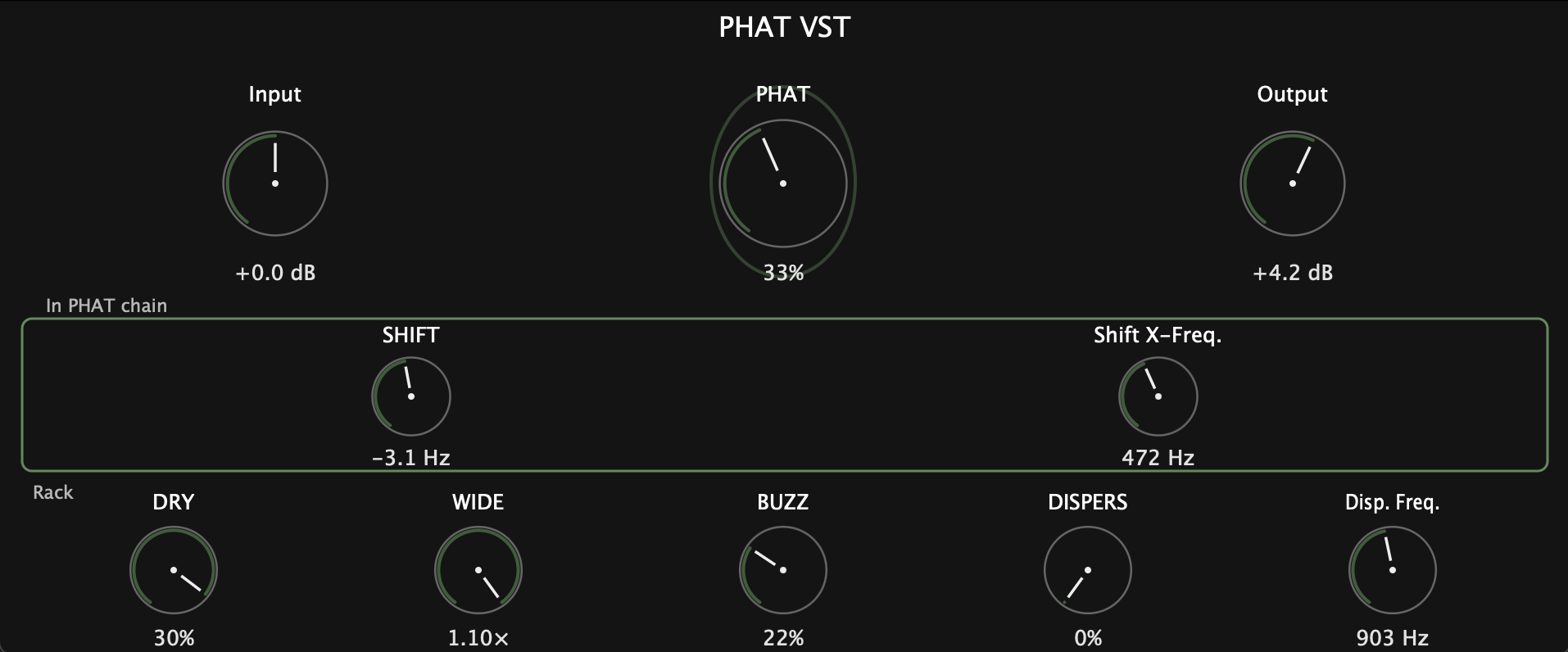
BUZZ · PHATPHAT VST is a free loudness processor for Windows and macOS (VST3) built around three ideas: shift the spectrum, disperse it through phase motion, and erode transients into sustained energy. The PHAT macro drives multiband density and harmonic gain; rack controls shape how aggressively the signal is worn down, smeared, and pushed forward.
Drop it on a loop, drum bus, or stem when you want the source to feel louder, denser, and more forward — not politely polished. DRY bleeds the original back in when erosion and dispersion run hot; WIDE adds stereo spread that further increases perceived size.
The loudness macro — drives how hard the whole processor hits. Scales multiband upward compression, saturation, overdrive color, EQ accents, and limiting so shifting, dispersion, and erosion add up to louder, not just weirder.
Parallel unprocessed blend, latency-aligned with the wet path. Counterweight to erosion and dispersion — brings transients and natural tone back when BUZZ, DISPERS, or PHAT are grinding too hard.
Stereo spread for perceived loudness. Below center, widening disengages. Turn it up and the image opens — more size on small speakers without a separate imager.
Erosion — parallel harmonic wear and sizzle. Grinds transients into sustained buzz; trades sharp attack for perceived level and density. Default is light seasoning (~20%).
Dispersion — allpass spectral motion. Ripples energy across the spectrum; transients blur and phase-shift into sustained wash. Makes material feel louder by filling spectral gaps.
Sets where dispersion happens (roughly 70 Hz to 18.5 kHz). Lower = body rippling; higher = top-end shimmer. Tune after DISPERS amount.
Shifting — bipolar frequency shift, neutral at center. Detunes sources and creates ghost harmonics so the same peak level feels less pinned and more aggressive.
Band split for shifting — defines what SHIFT moves. Low = bass content; high = mids and highs only.
Trim level before processing (−24 to +24 dB). Hit the sweet spot on quiet stems or hot loops without changing macro relationships.
Trim level after processing (−24 to +24 dB). Match perceived loudness when A/B testing, or compensate after pushing PHAT and BUZZ.
| Preset | Macros to highlight |
|---|---|
| Loud Loop | PHAT default+, WIDE mid, BUZZ light |
| Eroded Drums | PHAT high, BUZZ mid, DRY low |
| Dispersed Vocal | DISPERS mid, Disp. Freq. high, PHAT moderate |
| Ghost Shift | SHIFT subtle right, Shift X-Freq. high, PHAT mid |
| Full Grind | PHAT max, BUZZ mid, DISPERS light, DRY to taste |
| Wide & Forward | WIDE high, PHAT moderate, erosion/dispersion off |
PHAT VST by aldenbraverman · Free entry for KVR Developer Challenge 2026
 $79.00Comp TUBE-STA
Please log in to join the discussion
Submit: News, Plugins, Hosts & Apps | Advertise @ KVR | Developer Account | About KVR / Contact Us | Privacy Statement | Sell @ KVR | KVR Marketplace Terms & Conditions
© KVR Audio, Inc. 2000-2026