
1 KVR member has added Air-G EaseQ to 1 MyKVR group 1 time.
Download KVR Studio Manager (FREE)
Air-G EaseQ is part of Air-G Audio, a collection of plugins built on the open source work of Airwindows, Chris Johnson's ongoing project that has been releasing some of the most respected free DSP algorithms in the audio world.
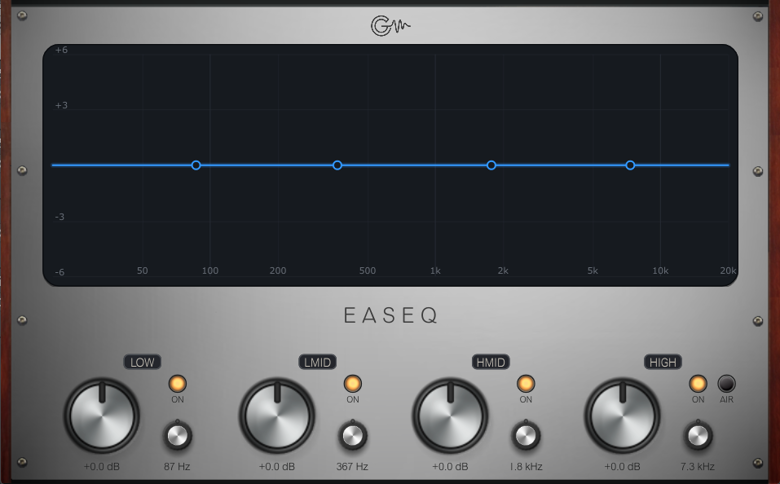
EaseQ is a four-band equalizer designed for tone shaping, not surgical corrections. Its curves are wide, smooth, and musical, closer in feel to an analog EQ than to the precision of a modern parametric. Each band has gain, frequency, and on/off controls. An AIR button adds a gentle high-shelf boost above 12 kHz. An interactive display draws the real frequency response in real time, with nodes you can drag directly with the mouse to adjust each band.
The engine is Airwindows' BezEQ3, which takes an unusual approach: instead of conventional resonant filters, it reconstructs the signal using smoothed Bezier curves, producing zero latency and perfect transparency at flat settings. The distinctive quality is that the bands interact with each other, so boosting one area inevitably influences others. It's not built for pinpoint frequency isolation; it's built to voice the sound, tilting the balance, opening the high end, adding body to the low end, in a broad organic way that sounds like the audio was always that way. Chris describes BezEQ3 as an EQ that sounds like no EQ was used at all.
EaseQ shines wherever the goal is broad tone shaping: mix buses, mastering, vocals, guitars, anything that needs a balance adjustment without showing the hand. It's not the tool for identifying and removing a specific problem frequency. It's the tool for making everything sound coherent.
---
Air-G Audio is a collection of plugins built on the open source code of Airwindows. The project is built around adding a graphical interface that makes the experience more comfortable and visual, along with a few features that expand the possible uses without straying from the original sound. The simplicity and lightness of Chris's code are the starting point and the guide.
Thanks to Chris Johnson for making his work public and accessible. Air-G Audio exists because Airwindows exists. The Airwindows code used in this plugin is published under the MIT License.
Air-G EaseQ is free. You can download it without paying anything, following the same open philosophy that runs through all of Chris's work. If the plugin is useful to you in your music, a contribution is always welcome. Chris Johnson's Patreon is also worth knowing about: it's the most direct way to support the Airwindows project and the work that makes plugins like this one possible. patreon.com/airwindows.
Available for Windows, Linux and macOS.
macOS note: the plugin is not signed with an Apple developer certificate, so Gatekeeper may block it on first use. The "Open Anyway" option in System Settings does not work reliably for VST3 plugins. The correct fix requires Terminal:
1. Open Terminal (Applications > Utilities > Terminal).
2. Type: sudo xattr -rd com.apple.quarantine (leave a space at the end, do not press Enter yet).
3. Open Finder, navigate to /Library/Audio/Plug-Ins/VST3/ and drag the plugin's .vst3 file into the Terminal window. The path fills in automatically.
4. Press Enter and type your admin password when prompted (it will not be visible). Press Enter again.
5. Rescan your plugin folder in your DAW. The plugin should now appear.

Please log in to join the discussion
Submit: News, Plugins, Hosts & Apps | Advertise @ KVR | Developer Account | About KVR / Contact Us | Privacy Statement | Sell @ KVR | KVR Marketplace Terms & Conditions
© KVR Audio, Inc. 2000-2026

