
944 KVR members have added LoudMax to 505 MyKVR groups 1106 times.
Download KVR Studio Manager (FREE)
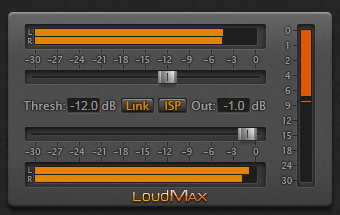
LoudMax is a Look-Ahead Brickwall Loudness Maximizer with a clean transparent sound. It is designed to retain the original character of the music as much as possible even at high compression levels.
Main range of application:
Controls:
Features:
Reviewed By probeginner4735 [all]
April 2nd, 2026
Version reviewed: 1.46 on Windows
The sound quality is excellent. While most similar plugins, which are usually paid, reduce sound quality or make it muffled, LoudMax allows you to achieve the desired value without ever compromising quality. Moreover, it's completely free. It's very easy to use. It also uses very little CPU power. This plugin is fantastic. Many thanks to the developer.
95% of commercial limiters can't compete with LoudMax's transparency. At reasonably high input gains it fully retains the dynamic integrity of your mix, and if you push it higher it still never truly "breaks", though the auto-release will eventually increase to achieve this.
Doesn't over-soften the transients despite the lookahead, is exceptionally low CPU usage even with ISP, sounds good on any material without having to configure it, there's so much to love here.
Reviewed By gipitt@hotmail.com [all]
September 18th, 2024
Version reviewed: 1.45 on Windows
I use this plugin all the time. It's amazingly simple, transparent, and powerful, all at the same time. It's a safeguard against overages on all my tracks and a quick and easy limiter for easy mastering for not finished tracks (I always say go to someone else for final mastering if you have mixed the project). Donate a coffee or two or more for this! Great plugin.
I have VSTs I have bought for limiting, but I always find myself going to this plugin. Overall, I like it because it doesn't really affect the sound on a drastic level, and is just a good useful limiter. I generally throw this on my mains for quick exports when sharing with people and I am always pleased. I should probably experiment with it more on channels. Amazing plugin.
The only limiter/maximizer you need. Dead simple, and helps you intuitively understand limiting and compression in general, whereas other more complex compressor plugins can leave you not understanding what exactly you're doing for years. No fuss with installation or activation.
The only thing you need to know is that it make quieter things louder than already loud things, and all without introducing clipping. A very desirable trait, since sometimes we want quieter things more audible in an overall mix, but we want to ensure that we're not distorting. Which is great not only for music but also streaming/podcasts. This of course lowers (or tightens) the dynamic range, and increases any pronounced noise floor. So it should be used sparingly if you wish to preserve dynamic range of say, a piano.
 $199.00Pro-L 2

This is the best free plugin!! Thanks!!! :D.
Thank you Thomas a lot for this plugin and for it's portable as well.
And I wonder could you also compile a standalon ver. of one?
An amazing plugin! Thank you for your generosity.
Help! I just loaded LoudMax to my /library/audio folders and validated that they were in fact in the right locations. However, when I open LoudMax with my Audacity DAW in MAC running macOS Monterey v 12.3.1 the dialog box opens when selected in the DAW but there is no graphic as shown on the website (absolutely blank.) I restarted my MAC as well and still nothing.
Any assistance is greatly appreciated.
Howard f. Hulin.
QualityVocalArtistry.com.
increase gui.it was cool.
Please log in to join the discussion
Submit: News, Plugins, Hosts & Apps | Advertise @ KVR | Developer Account | About KVR / Contact Us | Privacy Statement | Sell @ KVR | KVR Marketplace Terms & Conditions
© KVR Audio, Inc. 2000-2026

