Log InCreate An Account
  1. Plugins
  2. »
  3. Driftlab Audio
  4. »
  5. Tone Flow
  6. »
  7. Details
Tone Flow
Tone Flow by Driftlab Audio is a Virtual Effect Audio Plugin for Windows. It functions as a VST 3 Plugin.
Product
Version
1.0
Effect
Formats
Important Note
Windows Only, VST3 Only

MyKVR: Groups, Versions, ...

1 KVR member has added Tone Flow to 1 MyKVR group 1 time.

Download KVR Studio Manager (FREE)

Not In Your MY KVR Groups
(or group limitation prevents versioning)
+1 in private groups

KVR Rank

Overall: 9857   8701

30-Day: 15852; 7-Day: 30851; Yesterday: 36086

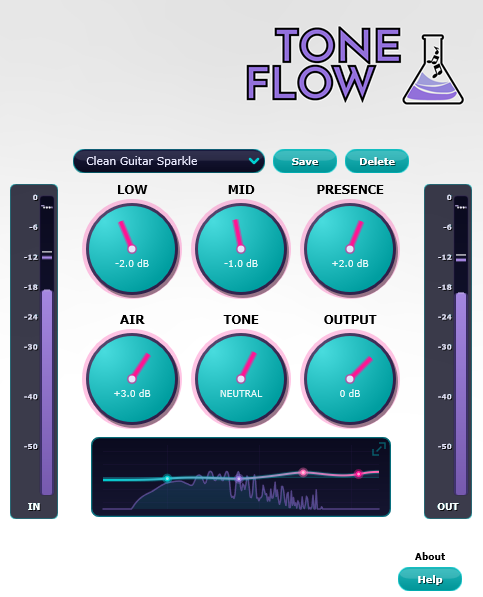
Tone Flow is a four-band EQ built around the frequencies you actually reach for — bass at 100 Hz, body at 600 Hz, presence at 3 kHz, and air at 12 kHz. The Tone knob on top lets you shift the whole sound from warm to bright with a single move, before you ever touch the individual bands.

Each band can boost or cut by 12 dB. Move a knob fast or automate it hard — there are no clicks, no zipper noise, and zero added latency. With everything centred, the audio passes through completely untouched. No tone colouring, no tricks.

The built-in spectrum analyzer shows your sound in real time behind the EQ curve, so you can see exactly where the energy is sitting. Click the small graph to expand it for a closer look. Input and output meters on either side keep your levels honest so the EQ never costs you a take:

  • 4 EQ bands - Bass at 100 Hz, body at 600 Hz, presence at 3 kHz, and air at 12 kHz. Each band cuts or boosts up to 12 dB with a smooth, musical sound — no Q knob to fight with, no math to do.
  • Tone knob - One knob shifts the whole sound from warm to bright. Pull it left to favour the lows, push it right to favour the highs. Perfect when you know the direction you want before fine-tuning each band.
  • Real-time spectrum analyzer - See your sound while you shape it. The spectrum sits behind the EQ curve so you can spot what's loud, what's harsh, and what's missing without leaving the plugin.
  • Expandable EQ graph - Click the small graph for a big, detailed view with full frequency and dB labels. Click anywhere to close it. Your knobs stay accessible the whole time.
  • Input & output meters - Peak and average meters on both sides of the plugin. See exactly how much the EQ is changing your level — and watch for clipping before it costs you a take.
  • Output level (–24 / +12 dB) - Boosting EQ bands tends to make things louder. The output knob lets you bring the level back down (or up) without re-routing your session — and automates cleanly with no clicks.
  • 50 factory presets - Starting points for guitars, bass, vocals, drums, keyboards, and full mixes. Tweak any preset and save it as your own — your presets travel with the project, so they're there when you reopen it.

Latest User Reviews

Average user rating of 0.00 from 0 reviews

Products similar to Tone Flow...

Comments & Discussion for Driftlab Audio Tone Flow

Discussion
Discussion: Active

Please log in to join the discussion

Log In To KVR Audio
